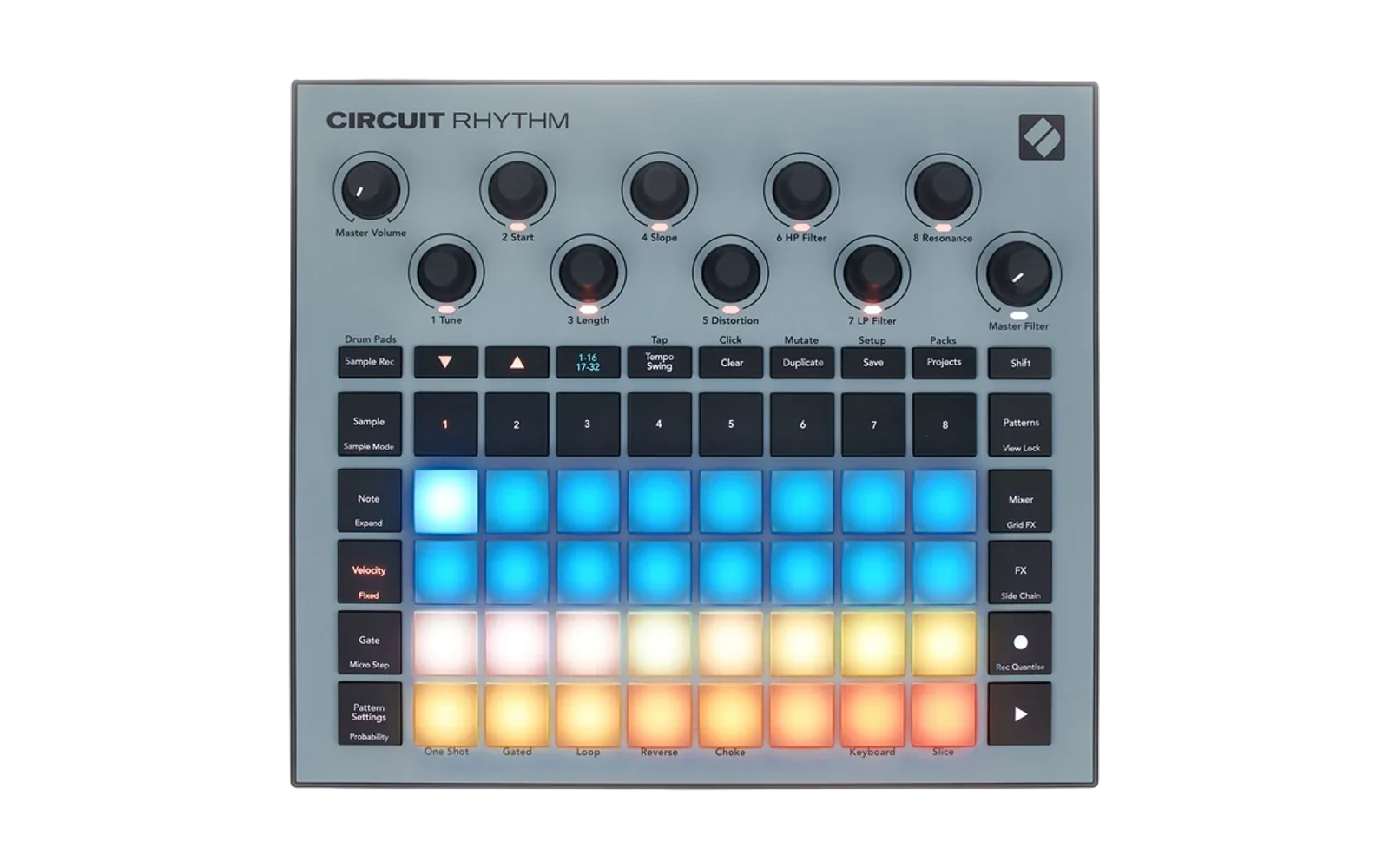
Circuit Remix
Help me pay for tools and mantain the project: https://PayPal.me/ghillermo
Contributors:
Aleš Janda: https://alesjanda.cz, https://github.com/kybl
No_Grand_9136: https://Reddit.com/user/No_Grand_9136
Theodor
Jens
If you want your name or website in this list, add it on your message when you send your contribution or send me a DM.
⛔ Alpha 0.09 / 0.09S: posiblemente defectuosas. En el aparato, Alpha 0.09 entra en un bucle de arranque al encenderla (se reinicia sin parar); 0.09S comparte su código y no se ha probado. Arreglado en Alpha 0.11 (arranca en frío y tras reiniciar). Si instalaste 0.09 y no arranca: mantén Sample Rec + Samples + Note al encender e instala Alpha 0.11, Alpha 0.08 o el firmware oficial.
📢 Alpha 0.11 (experimental): un port de las funciones de CIRCUIT-HACKS al Novation Circuit Rhythm, con características exclusivas. Descarga el instalador (
rm_uploader.zip), descomprímelo y abrerm_uploader.htmlen Chrome o Edge (cómo). Novedades:CHANGELOG.md.
⬇️ Descarga del parche de firmware (instalador): rm_uploader.zip · todas las versiones
Nota legal: el firmware proporcionado por Novation es propietario, no está permitido instalarlo en cualquier dispositivo que no sea Circuit Rhythm. Este instalador lo comprueba y no permite instalar en ningún otro dispositivo.
Trabajo humano: Hay una persona detrás de todo este trabajo. Este proyecto tiene una gran dedicación y esfuerzo en mantenimiento, depuración y conocimientos de desarrollo y de uso del dispositivo. Este proyecto escucha a la Comunidad y se comparte en formato copyleft de forma altruista, gratuita y abierta. Por favor, respeta este trabajo y el de los desarrolldores oficiales y no oficiales.
English: the English version of this README is further below.
Parches de firmware para el Novation Circuit Rhythm (firmware de referencia 2.0.1, build 5706).
Proyecto desarrollado usando Claude (Anthropic).
⚠️ Antes de instalar: copia de seguridad de la tarjeta SD.
- Haz una copia completa de la SD (proyectos, packs y samples) antes de enviar cualquier versión del mod.
- No trabajes con proyectos importantes guardados en el aparato mientras lo pruebas.
- Es una versión alfa: las funciones se han comprobado en emulación (el código del aparato ejecutado sobre un volcado de su memoria) y en parte en el aparato; podría haber problemas que dañen proyectos o samples guardados.
- ⚠️ Fallo conocido de Alpha 0.01, 0.01S, A0.01F y A01FS: pista 8. Los valores de la página Stock+ (envolvente y LFO de tono) estaban en la memoria del DSP donde la pista 8 lee su sample mientras suena, y se escriben siempre, aunque no uses la página. Con algo sonando en la pista 8 puede oírse chirridos, clics o siseo, y el tono puede irse. Arreglado en Alpha 0.02: actualiza. Alpha 0.0 / 0.0S no lo tienen.
- ⚠️ Fallo conocido de Alpha 0.01 / 0.01S / 0.02 / 0.02S (y A0.01F / A01FS): Stock+ tras encender. Recién encendido el aparato (no tras instalar), la página Stock+ puede no hacer nada durante unos minutos. La causa está en el firmware original: una palabra de configuración del DSP de las voces no se inicializa al arrancar, y según lo que tenga la memoria al encender, su puerto de comunicación con el procesador principal queda en un modo equivocado. Arreglado en Alpha 0.03: actualiza.
- ⚠️ Alpha 0.11 es experimental y necesita pulirse: casi todo lo nuevo (la matriz de modulación, los carriles, los módulos de Arrhythmia, la automatización, los modos en Sample mode, el FX hacia una entrada, la cuenta atrás con el reloj, Stock+ en el granular y el sinte, la envolvente, la entrada desde los retornos de FX, el sinte, la interfaz nueva, granular en varias pistas, menú de pista, entrada de línea, enlace estéreo, modo cue, General MIDI…) se ha comprobado solo en emulación. Para tocar en serio, Alpha 0.03 sigue en el instalador.
- Si prefieres no arriesgar la tarjeta, usa la versión más segura, Alpha 0.11S (o 0.03S): es Alpha 0.11 sin ninguna función que cree, modifique o borre ficheros en la SD por su cuenta (no tiene la copia de proyectos, el borrado de packs ni la copia de samples).
- El mod nunca escribe en el pack de la memoria interna: sus funciones de escritura lo rechazan (LED de Save en rojo). Lo que guarda el firmware original sigue funcionando como siempre.
- El bootloader de Novation no se toca: Sample Rec + Samples + Note al encender permite volver al firmware oficial.
Repositorio público
Este repositorio contiene solo el trabajo propio del proyecto:
- Herramientas: los builders de las versiones, el ensamblador Thumb, el parcheador y el instalador web.
- Documentación: el manual (por vistas, con glosario; versión ilustrada) y el CHANGELOG.
- Manifiestos de cada versión (
firmware/<versión>/manifest.json, con los SHA-256 del resultado).
No incluye:
- Código ni binarios de Novation: ni el firmware oficial ni los
.syx/.binparcheados, que contienen el firmware de Novation. Tú aportas el firmware oficial; el instalador y el parcheador comprueban su SHA-256. - Volcados del aparato (memoria, bootloader): las pruebas de emulación que los necesitan se quedan en el repositorio de desarrollo.
- Samples ni manuales de terceros.
Instalar sin compilar: tools/rm_uploader.html
- Descarga el firmware oficial Circuit Rhythm 2.0.1 (build 5706) de Novation: circuitrhythm-firmware-5706.syx. Es el enlace de descarga de Novation Components; la lista completa está en
https://components.novationmusic.com/api/v2/firmwares, productocircuit-rhythm. - Descarga el instalador (
rm_uploader.zip), descomprímelo y abrerm_uploader.htmlen Chrome o Edge (es el mismotools/rm_uploader.htmldel repositorio). - Elige el
.syxoficial y la versión: Alpha 0.11 (experimental) o la versión más segura Alpha 0.11S; Alpha 0.10 / 0.10S (lo mismo sin los módulos de Arrhythmia); Alpha 0.08 / 0.08S (arrancan en frío); Alpha 0.09 / 0.09S (⛔ posiblemente defectuosas: bucle de arranque); las anteriores Alpha 0.07 / 0.07S / 0.06 / 0.06S / 0.05 / 0.05S / 0.04 / 0.04S / 0.03 / 0.03S / 0.02 / 0.02S / 0.01 / 0.01S / 0.0 / 0.0S, u «Oficial» para volver atrás.- La página comprueba que el fichero es el firmware oficial (SHA-256) y lo parchea en el navegador.
- Comprueba que el resultado es idéntico, bit a bit, al publicado (SHA-256 de la imagen y del
.syx).
- Conecta el Circuit Rhythm y pulsa Enviar. Confirma con Play en el aparato.
La página no contiene código de Novation: solo los bytes del mod y las instrucciones para copiar el resto del firmware oficial que tú aportas (ningún tramo propio repite 8 bytes seguidos del firmware oficial). Haz antes una copia de la tarjeta SD.
En caso de brick (el aparato no arranca): desconéctalo de la corriente, mantén Sample Rec + Samples + Note mientras lo enciendes (modo bootloader de Novation) y envía «Oficial» con la misma página, o usa Novation Components.
Con Python (tools/patch_official.py)
python -m pip install -r tools/requirements.txt
python tools/patch_official.py RUTA/AL/circuitrhythm-firmware-5706.syx --version A0.11
- El firmware oficial es el Circuit Rhythm 2.0.1 (build 5706) de Novation Components, en
.syxo.bin; la herramienta comprueba su SHA-256 (stock/SHA256SUMS.txt). - Construye la versión en
firmware/<versión>/y comprueba que el.syxes idéntico al publicado (manifest.json). --version A0.11S= la versión más segura;--listenseña las versiones;--alllas construye todas.python tools/verify_builds.pyvuelve a construir las versiones y las compara con sus manifiestos.- Para enviarlo, lo más sencillo es
tools/rm_uploader.htmlcon el.syxoficial: hace lo mismo en el navegador y comprueba el mismo SHA-256.
Fixed Recording al tempo del reloj externo: A0.01F / A01FS
⚠️ Fallo conocido de Alpha 0.01, 0.01S, A0.01F y A01FS: pista 8. Los valores de la página Stock+ (envolvente y LFO de tono) estaban en la memoria del DSP donde la pista 8 lee su sample mientras suena, y se escriben siempre, aunque no uses la página. Con algo sonando en la pista 8 puede oírse chirridos, clics o siseo, y el tono puede irse. Arreglado en Alpha 0.02: actualiza. Alpha 0.0 / 0.0S no lo tienen.
Incluido en Alpha 0.02. A0.01F (Alpha 0.01 + el arreglo) y A01FS (Alpha 0.01S + el arreglo): con un reloj MIDI externo, Fixed Recording usa el tempo del reloj, no el del proyecto. Instalador: firmware/a0.01f/a001f_uploader.html. Detalles y pruebas: docs/FIXEDREC.md.
App de la tarjeta y del aparato: tools/rm_sd_app.html
Una página para ordenar packs, samples y patrones desde el ordenador, con la microSD o con el Circuit Rhythm conectado por USB. Funciona también con el firmware oficial.
- Descarga la app (
rm_sd_app.zip), descomprímela y abrerm_sd_app.htmlen Chrome o Edge (es el mismotools/rm_sd_app.htmldel repositorio). No necesita instalación ni servidor. - Elige de dónde leer:
- Abrir carpeta…: la carpeta
Rhythmde la tarjeta o de una copia en el ordenador. - Aparato…: el Circuit Rhythm por USB. Cierra Components y acepta el permiso de MIDI. El transporte se para y el panel queda bloqueado hasta Desconectar aparato.
- Abrir carpeta…: la carpeta
- Trabaja con las dos columnas: pestañas Packs, Samples (los 128, con escucha) y Patrones. Copiar y Mover pasan lo elegido a la otra columna.
- Patrones enseña las ocho pistas con su vista previa y, con el aparato conectado, su canal. Con doble clic se abre el editor: un golpe por paso, con nota, velocity, duración, probabilidad, sample flip, micropasos y los 12 carriles de automatización.
- Exportar… guarda lo elegido en el ordenador sin hacer un volcado completo: samples (
.wav), patrones (.midy.rmpat) y packs enteros. Lo exportado todavía no se puede volver a cargar desde la app. - Snapshot… y Restaurar… (con el aparato conectado) guardan en el ordenador todos los packs y el pack interno, y devuelven al aparato solo lo que haya cambiado, tras enseñarte un plan. El pack interno no se escribe de vuelta, y los packs que no estén en el snapshot se quedan. No incluye los ajustes del aparato ni lo que no hayas guardado del proyecto.
- Renombrar… (pestañas Packs y Samples) cambia solo el nombre tras el prefijo
NN_y rechaza un nombre que rompería los datos: vacío, demasiado largo, con caracteres que la tarjeta no admite, con un espacio o un punto en un extremo, o igual a otro fichero. - Módulos (prueba de concepto)… sube, comprueba, arranca y para un módulo de Arrhythmia en un Circuit Rhythm con Alpha 0.11 o posterior (ver el manual). Los módulos son de Arrhythmia (llcoolkm, MIT) y no están en este repositorio: descárgalos de sus releases.
Antes de escribir: la app guarda lo que sustituye en una carpeta tuya del ordenador, nunca en la tarjeta: el aparato busca los ficheros por su prefijo NN_ y una copia dentro de un pack puede ocupar el lugar del original. Por USB, cada escritura borra primero el fichero antiguo. Esta versión aún no se ha probado en un Circuit Rhythm real: se ha comprobado en emulación, contra el código del firmware 5706 y de Alpha 0.09 (la de Circuit Tracks sí se ha usado en un aparato). Haz antes un snapshot o una copia de la tarjeta.
Características (Alpha 0.11)
Manual completo, vista por vista y con un glosario de funciones: docs/MANUAL.md (texto) o ilustrado.
Nuevo en Alpha 0.11 (experimental): el arreglo del bucle de arranque de 0.09; la matriz de modulación (8 fuentes por pista hacia 32 destinos), los carriles con destino propio (Secuenciables) y los No secuenciables, el carril extra y las rampas; los modificadores del arpegio, el Nudge de tramo, guardar al parar y la curva de velocity; el «1 de n» que sigue a su patrón en las cadenas; el destello de las pistas con Shift; y los módulos de Arrhythmia por USB (prueba de concepto; los módulos son de Arrhythmia, de sus releases). Alpha 0.10 / 0.10S = lo mismo sin los módulos.
Nuevo en Alpha 0.09 (experimental): la automatización de CIRCUIT-HACKS: con Velocity + Shift (o Velocity otra vez, fija) los pasos con automatización de knobs en amarillo y se escuchan con un toque, Clear + paso la borra, un paso marcado vuelve a Project init (como se cargó o guardó), snapshot con Record + paso, pad 8 rojo del menú = la voz a Project init; los modos de la pista en Sample mode (pads 5-8, 14-16); el FX hacia una entrada deja el master y su realimentación a la mitad; enlace estéreo con desviaciones en la segunda pista; inicio y longitud del original en el granular y el sinte (morph y unísono); sin parpadeos en el botón de la pista.
Nuevo en Alpha 0.08 (experimental): la cuenta atrás con el reloj de la música (contribución de mefisme): los clics siguen el tempo o, como esclavo, el reloj MIDI externo (el primer clic en el compás del maestro), el 1 llega a tiempo, durante la cuenta no se graba nada; metrónomo visual (con el clic a 0, Clear destella en naranja en cada tiempo); Play carga los pasos más rápido; el pad 15 de la entrada sin FX, tenue.
Nuevo en Alpha 0.07 (experimental): Stock+ para todos los sonidos: la página Stock+ (menú pad 2) también en el granular y el sinte (envolvente y LFO de tono, ring, filtros, waveshaper en K7 con su tipo en Shift + K7, K8 = LFO de la posición de los granos / de la FM); el knob de distorsión de la pista también en el granular y el sinte.
Nuevo en Alpha 0.06 (experimental): la envolvente por modo de reproducción para el sinte y el granular (página Envolvente, menú pad 5: inicio, longitud, pendiente, → filtro); la entrada de línea desde los retornos de reverb o delay (pad 15) y su gate con el filtro de la pista.
Nuevo en Alpha 0.05 (experimental): el sinte (dos osciladores con FM, sync, SUB, ruido y glide en hasta 4 pistas, con su página de knobs); la interfaz nueva (un color por página de knobs; el menú de pista con las páginas en los pads 1-4 y los conmutadores debajo; un toque en el botón de la pista elegida deja el menú abierto, mantenerlo lo muestra hasta soltar; las páginas, solo las del sonido de la pista; las mitades a tempo de Stock+ K3 / K8 más rápidas hacia el extremo izquierdo; apagado = el mismo color, tenue).
Nuevo en Alpha 0.04 (experimental): menú de pista (mantener su botón); granular en hasta 4 pistas, con su página de knobs, la nota, el filtro y la envolvente de la pista y apertura estéreo; la entrada de línea como sonido de una o dos pistas; enlace estéreo de dos pistas; Sample Rec estéreo; de-clicker de loops y loops cortos a su longitud; K3 / K8 de Stock+ a tempo; ajuste al patrón con stretch; modo cue en el Mixer; longitud fija y gate por pulsación en Micro Step; liberar la automatización por paso; modo General MIDI; teclado externo al arpegiador; fusión USB; la reproducción empieza antes y el reloj no tropieza al guardar. Detalle: CHANGELOG.md.
Portadas de CIRCUIT-HACKS:
- Metrónomo con cuenta atrás: Shift + Clear recorre sin metrónomo / metrónomo / solo cuenta atrás / las dos; un compás de cuenta antes de grabar (también con Shift + Play parado: la cuenta y luego sigue desde donde paró).
- Cuantizar: Shift + Play con el patrón sonando cuantiza a sus pasos el patrón de la pista elegida.
- Mixer: Shift + pad de pista = mute en el compás siguiente; Shift + knob (niveles) = 100 / 0; Shift + pads 9-16 = la escena actual se repite 1-8 veces.
- Clear + botón de pista = sus knobs por defecto y su automatización borrada.
- Pattern Settings: pad 26 = Nudge; pads 27 / 28 = órdenes fractal y deconstruido.
- Por paso: frecuencia (cada n pasadas), dinámicas y mutación del sample.
- Cadenas de patrones con reglas («n veces A, luego B; la siguiente, C») y modo cadena por escena.
- Vista Sidechain: K1-K4 = ataque, hold, decay y profundidad del sidechain de la pista; K6 soft clip, K7 / K8 ataque y release del compresor master.
- Vista FX: ▲ / ▼ = envíos de delay / reverb; Shift + knob = parámetros de reverb y delay; Shift + ▲ / ▼ = resonancia del filtro master; Duplicate = reset.
- Clear + knob = valor por defecto en las vistas FX y Sidechain.
- Arpegiador (Shift + pads 17-32 de Pattern Settings): orden, resolución, y se graba con Record.
- Escala propia con periodo libre (hasta 24 semitonos).
- Copiar proyectos a otro hueco o a otro pack (vista Projects, Duplicate + A, Duplicate + B; no en Alpha 0.01S).
- Setup: MIDI Thru con Merge y Filter; canales propios de Program Change (escucha y salida).
- Los knobs de Sidechain y de FX con Shift muestran su valor como brillo.
- Umbral del compresor master en K5 de la vista Sidechain (desde Alpha 0.01).
- Repetición de escena: en el Mixer con Shift, la vuelta que suena en blanco (desde Alpha 0.01).
- Las dinámicas se graban en el paso con Record (desde Alpha 0.01).
Exclusivas de Circuit Remix:
- Copiar una pista a otra: Duplicate + pista A, luego pista B = B recibe los parámetros y el sample elegido de A.
- Restablecer una pista: Clear + botón de pista = además de los knobs, el resto de parámetros y el sample vuelven a como estaban al cargar el proyecto.
- Arpegiador de samples y de notas: varios pads de sample mantenidos arpegian los samples (cada golpe es un sample flip); en la vista Note, las teclas mantenidas arpegian el sample de la pista; con Record, el arpegio se graba en el patrón.
- Escala propia por pista, con una iteración por fila de pads (dos si caben).
- Página Stock+ de los knobs de pista (desde Alpha 0.01; K5-K8 desde Alpha 0.02): pulsa otra vez el botón de la pista elegida (desde Alpha 0.04: mantén el botón, pad 2); K1 / K2 = envolvente de tono (cantidad y caída), K3 / K4 = LFO de tono (velocidad y profundidad), con Shift = ajuste fino; K5 ring mod (Shift: frecuencia), K6 pitch follow (Shift: tipo de filtro stock / 24 dB / comb), K7 stretch 0,25×-4× sin cambiar el tono (Shift: bitcrush), K8 scan del punto de inicio (Shift: profundidad); se guarda con el proyecto. Código propio en el DSP de las voces.
- Fixed Recording al tempo del reloj MIDI externo (desde Alpha 0.02; el arreglo de mefisme), y desde Alpha 0.08 la cuenta atrás con el reloj de la música, también de mefisme.
- Borrar un pack desde el aparato (Packs: Clear + pack dos veces) y copiar un sample a otro hueco, también desde otro pack (Sample Rec: Duplicate + A, Duplicate + B) (desde Alpha 0.01; no en Alpha 0.01S).
Circuit Rhythm, Components y Novation son marcas de Focusrite Audio Engineering Ltd. Este proyecto no está afiliado a ellos.
English
⛔ Alpha 0.09 / 0.09S: potentially flawed. On the device, Alpha 0.09 boot-loops when switched on (it keeps restarting); 0.09S shares its code and has not been tested. Fixed in Alpha 0.11 (it boots cold and after a restart). If you installed 0.09 and it does not start: hold Sample Rec + Samples + Note while switching on and install Alpha 0.11, Alpha 0.08 or the official firmware.
📢 Alpha 0.11 (experimental): a port of the CIRCUIT-HACKS features to the Novation Circuit Rhythm, with exclusive features. Download the installer (
rm_uploader.zip), unzip it and openrm_uploader.htmlin Chrome or Edge. What's new:CHANGELOG.md.
⬇️ Firmware patch download (installer): rm_uploader.zip · all versions
Legal note: the firmware provided by Novation is proprietary; installing it on any device other than a Circuit Rhythm is not allowed. This installer checks it and does not allow installing it on any other device.
Firmware patches for the Novation Circuit Rhythm (reference firmware 2.0.1, build 5706).
Developed using Claude (Anthropic).
⚠️ Before installing: back up the SD card.
- Make a full copy of the SD card (projects, packs and samples) before sending any version of the mod.
- Do not work on important projects stored on the device while you test it.
- This is an alpha: the features were checked in emulation (the device's code run on a dump of its memory) and partly on the device; there could be problems that damage stored projects or samples.
- ⚠️ Known bug in Alpha 0.01, 0.01S, A0.01F and A01FS: track 8. The Stock+ page's values (pitch envelope and LFO) sat in the DSP memory where track 8 reads its sample while it plays, and they are written all the time, even if you never use the page. With something playing on track 8 you may hear chirps, clicks or hiss, and its pitch may drift. Fixed in Alpha 0.02: please update. Alpha 0.0 / 0.0S are not affected.
- ⚠️ Known bug in Alpha 0.01 / 0.01S / 0.02 / 0.02S (and A0.01F / A01FS): Stock+ after power-on. Right after switching the device on (not after installing), the Stock+ page may do nothing for a few minutes. The cause is in the original firmware: a configuration word of the voices' DSP is not initialised at start-up, and depending on what the memory holds at power-on, its link to the main processor is left in the wrong mode. Fixed in Alpha 0.03: please update.
- ⚠️ Alpha 0.11 is experimental and needs refinement: almost everything new (the modulation matrix, the lanes, Arrhythmia's modules, the automation, the modes in Sample mode, an FX into an input, the count-in on the clock, Stock+ on the granular and the synth, the envelope, the line input from the FX returns, the synth, the new interface, granular on several tracks, track menu, line input, stereo link, cue mode, General MIDI…) has only been checked in emulation. For serious playing, Alpha 0.03 is still in the installer.
- If you would rather not risk the card, use the safer build, Alpha 0.11S (or 0.03S): Alpha 0.11 without any feature that creates, changes or deletes files on the SD card by itself (no project copy, pack delete or sample copy).
- The mod never writes to the internal memory pack: its write features refuse it (Save LED red). Saving from the original firmware works as always.
- Novation's bootloader is not touched: Sample Rec + Samples + Note at power-on lets you go back to the official firmware.
Public repository
This repository holds only the project's own work: the builders of the versions, the Thumb assembler, the patcher, the web installer, the manual (by view, with a glossary; illustrated), the CHANGELOG and each version's manifest (with the SHA-256 of the result).
It does not include Novation code or binaries (neither the official firmware nor the patched .syx / .bin, which contain Novation's firmware: you provide the official firmware, and the installer and the patcher check its SHA-256), device dumps (memory, bootloader; the emulation tests that need them stay in the development repository), or third-party samples or manuals.
Install without building: tools/rm_uploader.html
- Download the official firmware Circuit Rhythm 2.0.1 (build 5706) from Novation: circuitrhythm-firmware-5706.syx (Novation Components' download link; the full list is at
https://components.novationmusic.com/api/v2/firmwares, productcircuit-rhythm). - Download the installer, unzip it and open
rm_uploader.htmlin Chrome or Edge (the sametools/rm_uploader.htmlas in the repository). - Pick the official
.syxand the version: Alpha 0.11 (experimental) or the safer Alpha 0.11S; Alpha 0.10 / 0.10S (the same without Arrhythmia's modules); Alpha 0.08 / 0.08S (they boot cold); Alpha 0.09 / 0.09S (⛔ potentially flawed: boot loop); the earlier Alpha 0.07 / 0.07S / 0.06 / 0.06S / 0.05 / 0.05S / 0.04 / 0.04S / 0.03 / 0.03S / 0.02 / 0.02S / 0.01 / 0.01S / 0.0 / 0.0S, or “Official” to go back. The page checks that the file is the official firmware (SHA-256), patches it in the browser and checks that the result is bit for bit the published one (SHA-256 of the image and of the.syx). - Connect the Circuit Rhythm and press Send. Confirm with Play on the device.
The page contains no Novation code: only the mod's bytes and the instructions to copy the rest of the official firmware you provide (no run of our own bytes repeats 8 consecutive bytes of the official firmware). Back up the SD card first.
If the device is bricked (it does not start): unplug it from power, hold Sample Rec + Samples + Note while you power it on (Novation's bootloader mode) and send “Official” with the same page, or use Novation Components.
With Python (tools/patch_official.py)
python -m pip install -r tools/requirements.txt
python tools/patch_official.py PATH/TO/circuitrhythm-firmware-5706.syx --version A0.11
The tool checks the official firmware's SHA-256, builds the version in firmware/<version>/ and checks that the .syx is identical to the published one. --version A0.11S = the safer build; --list, --all. python tools/verify_builds.py rebuilds the versions and compares them with their manifests. Send the .syx with tools/rm_uploader.html.
Fixed Recording at the external clock's tempo: A0.01F / A01FS
⚠️ Known bug in Alpha 0.01, 0.01S, A0.01F and A01FS: track 8. The Stock+ page's values (pitch envelope and LFO) sat in the DSP memory where track 8 reads its sample while it plays, and they are written all the time, even if you never use the page. With something playing on track 8 you may hear chirps, clicks or hiss, and its pitch may drift. Fixed in Alpha 0.02: please update. Alpha 0.0 / 0.0S are not affected.
Included in Alpha 0.02. A0.01F (Alpha 0.01 + the fix) and A01FS (Alpha 0.01S + the fix): with an external MIDI clock, Fixed Recording uses the clock's tempo, not the project tempo. Installer: firmware/a0.01f/a001f_uploader.html. Details and tests: docs/FIXEDREC_EN.md.
Card and device app: tools/rm_sd_app.html
A page to organise packs, samples and patterns from the computer, with the microSD card or with the Circuit Rhythm connected by USB. It also works with the official firmware.
- Download the app (
rm_sd_app.zip), unzip it and openrm_sd_app.htmlin Chrome or Edge (it is the repository'stools/rm_sd_app.html). It needs no installation and no server. - Choose where to read from:
- Open folder…: the
Rhythmfolder of the card or of a copy on the computer. - Device…: the Circuit Rhythm over USB. Close Components and accept the MIDI permission. The transport stops and the panel stays locked until Disconnect device.
- Open folder…: the
- Work with the two columns: tabs Packs, Samples (all 128, with listening) and Patterns. Copy and Move send what you chose to the other column.
- Patterns shows the eight tracks with their preview and, with the device connected, their channel. Double click opens the editor: one hit per step, with note, velocity, length, probability, sample flip, micro steps and the 12 automation lanes.
- Export… saves what you chose on the computer without a full dump: samples (
.wav), patterns (.midand.rmpat) and whole packs. What is exported cannot be loaded back from the app yet. - Snapshot… and Restore… (with the device connected) save all the packs and the internal pack on the computer, and send back only what changed, after showing you a plan. The internal pack is not written back, and packs that are not in the snapshot stay. It does not include the device's settings or whatever is unsaved in the project.
- Rename… (Packs and Samples tabs) changes only the name after the
NN_prefix and refuses a name that would break the data: empty, too long, with characters the card does not allow, with a space or dot at either end, or the same as another file. - Modules (proof of concept)… uploads, checks, starts and stops an Arrhythmia module on a Circuit Rhythm running Alpha 0.11 or later (see the manual). The modules are Arrhythmia's (llcoolkm, MIT) and are not in this repository: download them from its releases.
Before writing: the app keeps what it replaces in a folder of yours on the computer, never on the card: the device finds files by their NN_ prefix and a copy inside a pack can take the original's place. Over USB, each write deletes the old file first. This version has not been tried on a real Circuit Rhythm yet: it was checked in emulation, against the code of firmware 5706 and of Alpha 0.09 (the Circuit Tracks version has been used on a device). Take a snapshot or a copy of the card first.
Features (Alpha 0.11)
Full manual, view by view, with a glossary of functions: docs/MANUAL_EN.md (text) or illustrated.
New in Alpha 0.11 (experimental): the fix for 0.09's boot loop; the modulation matrix (8 sources per track to 32 destinations), lanes with their own destination (Sequenceable) and the Non-sequenceable page, the extra lane and ramps; arpeggio modifiers, range Nudge, save on stop and the velocity curve; 1-in-n that follows its own pattern in chains; the track flash with Shift; and Arrhythmia modules over USB (proof of concept; the modules are Arrhythmia's, from its releases). Alpha 0.10 / 0.10S = the same without the modules.
New in Alpha 0.09 (experimental): CIRCUIT-HACKS' automation: with Velocity + Shift (or Velocity again, latched) steps with knob automation show yellow and a tap plays them, Clear + step erases it, a marked step goes back to Project init (as loaded or saved), a snapshot with Record + step, the menu's red pad 8 = the voice back to Project init; the track's modes in Sample mode (pads 5-8, 14-16); an FX into an input leaves the master with its feedback halved; stereo link with offsets on the second track; the original's start and length on the granular and the synth (morph and unison); no more blinking on the track's button.
New in Alpha 0.08 (experimental): the count-in on the music's clock (contributed by mefisme): the clicks follow the tempo or, as a slave, the external MIDI clock (the first click on the master's bar), the 1 is on time, nothing records during the count; a visual metronome (with the click at 0, Clear flashes orange on each beat); Play loads the steps faster; the line input's pad 15 with no FX, dim.
New in Alpha 0.07 (experimental): Stock+ for every sound: the Stock+ page (menu pad 2) on the granular and the synth too (pitch envelope and LFO, ring, filters, a waveshaper on K7 with its type on Shift + K7, K8 = an LFO on the grains' position / the FM); the track's distortion knob on the granular and the synth too.
New in Alpha 0.06 (experimental): the envelope by play mode for the synth and the granular (Envelope page, menu pad 5: start, length, slope, → filter); the line input from the reverb or delay returns (pad 15) and its gate through the track's filter.
New in Alpha 0.05 (experimental): the synth (two oscillators with FM, sync, SUB, noise and glide on up to 4 tracks, with its knob page); the new interface (a colour per knob page; the track menu with the pages on pads 1-4 and the toggles below; a tap on the selected track's button leaves the menu open, holding shows it until you let go; only the pages of the track's sound; Stock+ K3 / K8 synced halves faster towards the left end; off = the same colour, dim).
New in Alpha 0.04 (experimental): a track menu (hold its button); granular on up to 4 tracks, with its knob page, the note, the track's filter and envelope and a stereo spread; the line input as the sound of one or two tracks; a stereo link of two tracks; stereo Sample Rec; a loop de-clicker and short loops at their own length; Stock+ K3 / K8 synced to the tempo; fit to the pattern with stretch; a cue mode in the Mixer; fixed length and gate by press in Micro Step; per-step automation release; General MIDI mode; an external keyboard into the arpeggiator; USB merge; playback starts sooner and the clock does not stumble while saving. Details: CHANGELOG.md.
Ported from CIRCUIT-HACKS: metronome with count-in (Shift + Clear); quantize (Shift + Play while playing); Mixer: mute on the next bar (Shift + track pad), Shift + knob = level 100 / 0, scene repeats (Shift + pads 9-16); Clear + track button = its knobs to default and its automation cleared; Pattern Settings: Nudge (pad 26), fractal and deconstructed orders (pads 27 / 28); per step: frequency, dynamics and sample mutation; pattern chains with rules; Sidechain view knobs (sidechain of the track, soft clip, master compressor attack / release); FX view keys and reverb / delay parameters, master filter resonance, reset; Clear + knob = default in the FX and Sidechain views; arpeggiator (order, rate, recorded with Record); custom scale with a free period; project copy to another slot or pack (not in Alpha 0.01S); master compressor threshold on K5 of the Sidechain view, the playing scene repeat shown white in the Mixer with Shift, dynamics recorded into the step with Record (since Alpha 0.01); MIDI Thru Merge / Filter; Program Change channels; knob brightness = value.
Exclusive to Circuit Remix: copy a track to another (Duplicate + track A, then track B: parameters and selected sample); reset a track (Clear + track button: the other parameters and the sample back to how the project was loaded); sample and note arpeggiator on the sample tracks (each hit a sample flip; in the Note view, the held keys arpeggiate the track's sample; recorded with Record); a custom scale per track, one iteration per pad row; the Stock+ track knob page (since Alpha 0.01, K5-K8 since Alpha 0.02: press the selected track's button again (since Alpha 0.04: hold the button, pad 2); K1 / K2 = pitch envelope amount and decay, K3 / K4 = pitch LFO rate and depth, Shift = fine control; K5 ring mod (Shift: frequency), K6 pitch follow (Shift: filter type stock / 24 dB / comb), K7 stretch 0.25×-4× without changing pitch (Shift: bitcrush), K8 start-point scan (Shift: depth); saved with the project; its own code in the voices' DSP); Fixed Recording at the external MIDI clock's tempo (since Alpha 0.02, mefisme's fix) and since Alpha 0.08 the count-in on the music's clock, also by mefisme; delete a pack on the device (Packs: Clear + pack twice) and copy a sample to another slot, also from another pack (Sample Rec: Duplicate + A, Duplicate + B) (since Alpha 0.01; not in Alpha 0.01S).
Circuit Rhythm, Components and Novation are trademarks of Focusrite Audio Engineering Ltd. This project is not affiliated with them.