CHOMPI-lnetzel
Rising62/100All of the production files, hardware and firmware, that make up the CHOMPI Sampler.
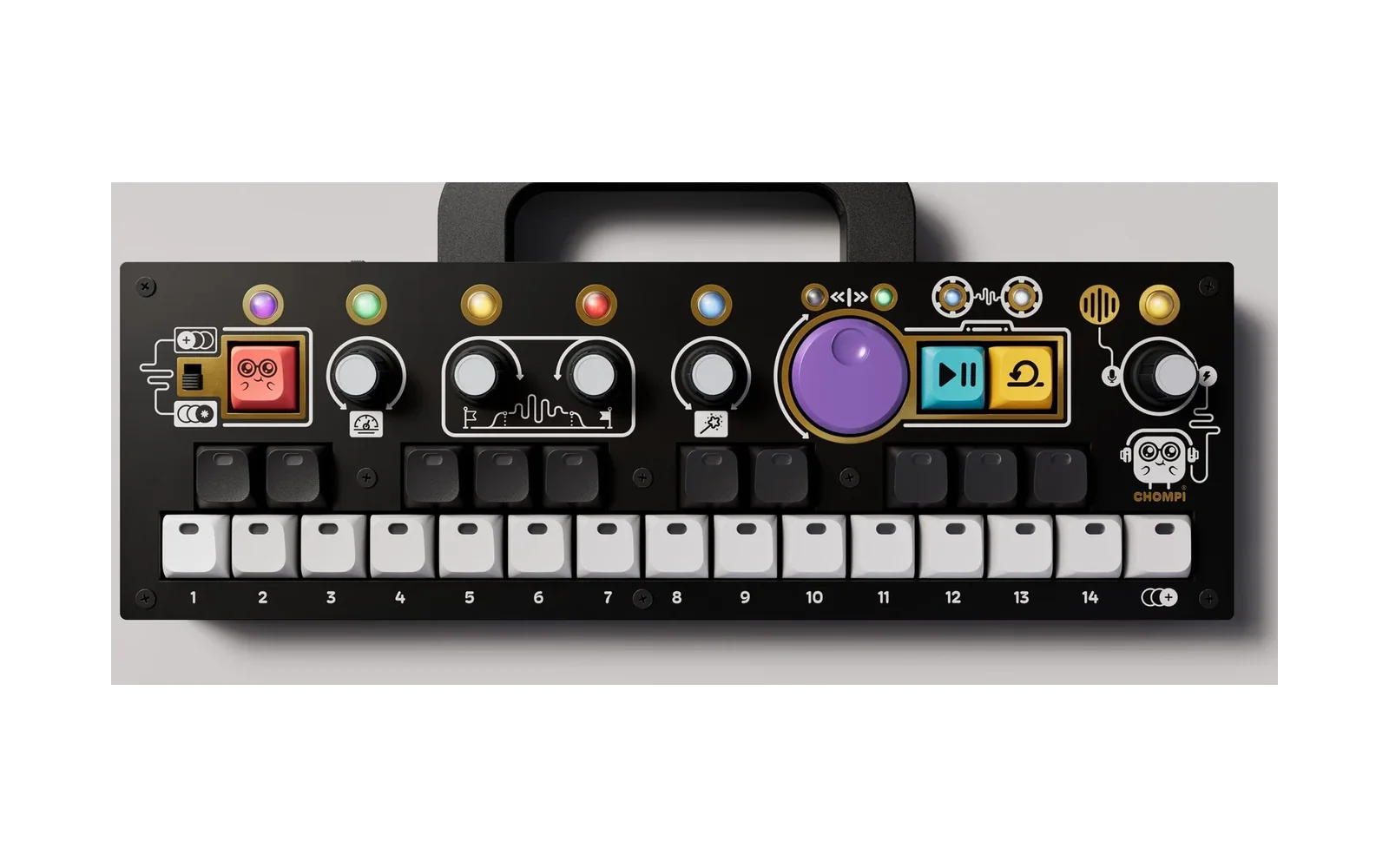
CHOMPI-lnetzel is custom firmware for the CHOMPI Club CHOMPI, by @lnetzel. Open source under MIT, latest release usb-storage-v1.6 (October 2026), 2 stars on GitHub.
forCHOMPI Club CHOMPI·by@lnetzel
Unclaimed. Is this yours? Sign in with GitHub as @lnetzel to claim it.
chompi_usb_storage_v1.6.bin· 89 KB
MIT· lnetzel/CHOMPI-lnetzel·downloads come from the creator’s GitHub releases
TAPE-lnetzel-1.2TAPE (lnetzel) v1.2Beta1 file
This is based on the original TAPE v2.0. The ambition is to enhance some of the user work flow but not to stray away from the origianl vision for TAPE.
New in TAPE (lnetzel) 1.2
Added Sample Rate Reducer to FX engine
- Added the algorithm from TEMPO's sample rate reducer (the one from SHIFT+ Turn on pg.3) to a new pg.4 (green LED) of the FX engine..
- Turning it right will reduce the sample rate from 31.7kHz down to 480hz. Step size is 320Hz
- There is no shift combo implemented as this point
(use with Multi-Firmware Launcher 1.1)
usb-storage-v1.6USB Storage v1.6 — use the SD card in CHOMPI as a USB drive1 file
Connect your CHOMPI Sampler to a computer via USB and mount the SD Card as USB disk. It's class compliant and will not need any drivers installed. This build is also included in the Multi-Firmware Launcher v1.1 for CHOMPI, a community driven release.
It mounts as
CHOMPI-SDNew features in v1.6
- Eject the disk from the operating system and CHOMPI will reboot (entering Multi-Firmware launcher again if using that)
IMPORTANT: This is not an instrument and does not add USB mounting to CHOMPI TAPE, TEMPO or WAVE. The idea is to use this in combination with Multi-Firmware Launcher to reduce the need to move the SD card from CHOMPI to an external SD card reader when wanting to extract recordings or adding new audio files.
TAPE-lnetzel-1.1TAPE (lnetzel) v1.11 file
This is based on the original TAPE v2.0. The ambition is enhance some of the user work flow but not to stray away from the origianl vision for TAPE.
New in TAPE (lnetzel) 1.1
Undo overdub:
- One undo level. An overdub session is everything written from entering overdub until leaving it, including multiple loop revolutions.
- How to use it: While holding SHIFT key press the transport wheel. CHOMPI LED will blink red and the two wheel direction LEDs will blink green. You are basically being asked "Are you sure you want to remove last overdub?" CHOMPI press confirms and will remove the last overdub, Transport Wheel press will cancel.
- Maximum loop buffer length has been cut in half to implement this so it's now 82.5 seconds (was about 165 seconds).
- There is no redo, once undone, it's gone.
- You cannot undo an append-paste to looper, that's not the same as an overdub session.
(use with Multi-Firmware Launcher 1.1)
TAPE-lnetzelTAPE (lnetzel) v1.01 file
This is based on the original TAPE v2.0. The ambition is enhance some of the user work flow but not to stray away from the origianl vision for TAPE.
What's changed in TAPE (lnetzel) 1.0 from the official TAPE v2.0?
- Improved reliability of sample start and end position trimming (now also supports down to 5ms)
- Added a pg.3 (yellow) to gain/volume encoder to adjust looper playback volume
- Trimmed copy/paste to looper (only audio between start and end position is copied to the looper) Note: Copy pasting to another preset slot in untouched
- Possibility to paste-append to the looper (selecting destination with overdub key will append to looper buffer while play key will replace the looper buffer)
- Removed hardware self-test to save sram and sram_exec for future features
(use with Multi-Firmware Launcher 1.1)
usb-storage-v1.5USB Storage v1.5 — use the SD card in CHOMPI as a USB drive1 file
Connect your CHOMPI Sampler to a computer via USB and mount the SD Card as USB disk. It's class compliant and will not need any drivers installed. This build is also included in the Multi-Firmware Launcher v1.1 for CHOMPI, a community driven release.
It mounts as
CHOMPI-SDNew features in v1.5
- Restart with Overdub key - To minimize wear and tear of the physical power switch you can now restart CHOMPI by pressing the Overdub key and confirm with Chompi key. It will reboot short after.
- When booting up the bottom row of keys 1-15 will light up in blue from left to right indicating how much disk space is used on the SD card. e.g if 50% of the card is used key 1-7 will be blue and key 8 with be 50% blue.
Watch demo on youtube: https://www.youtube.com/watch?v=G-hG1segknY)
IMPORTANT: This is not an instrument and does not add USB mounting to CHOMPI TAPE, TEMPO or WAVE. The idea is to use this in combination with Multi-Firmware Launcher to reduce the need to move the SD card from CHOMPI to an external SD card reader when wanting to extract recordings or adding new audio files.