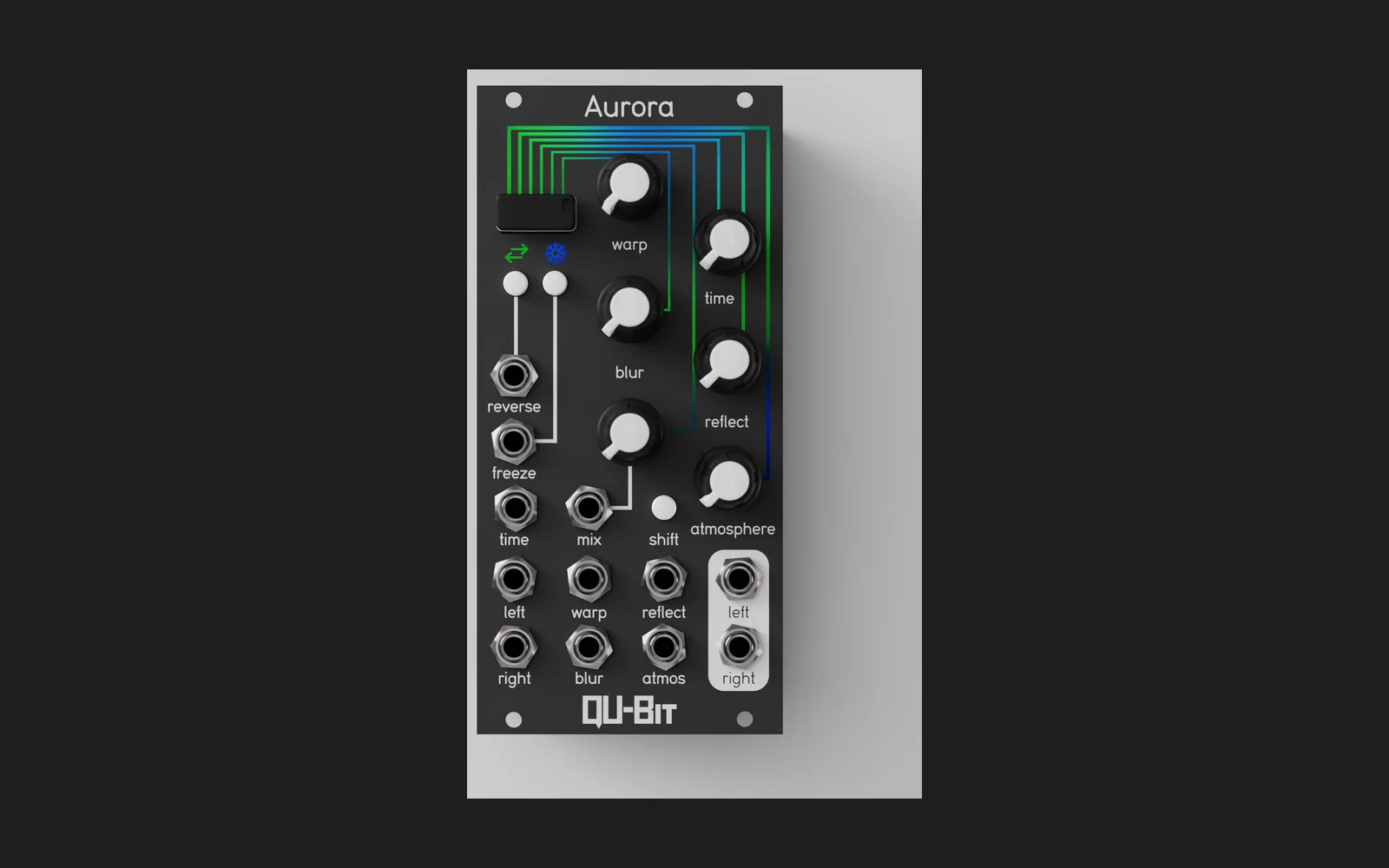
Aurorus
Morphing chorus/flanger/phaser firmware for the Qu-Bit Aurora Eurorack module.
Features
Aurorus turns the Aurora into a single continuously-morphing modulation effect. Turn one knob and slide smoothly from chorus, through flanger, into phaser — no switching, no discrete modes, just one knob sweeping through all three classic modulation textures.
- Continuous morph — one knob crossfades chorus → flanger → phaser using an equal-power curve, so the effect never dips in volume mid-sweep and only two textures are ever blended at once
- Shared rate, depth, feedback, and mix controls — the same four knobs shape whichever effect (or blend) is currently active
- Stereo width — detunes the left/right modulation rate against each other so the effect blooms into stereo instead of collapsing to mono
- Freeze — holds the current modulation phase in place while held, for a static, frozen texture
- Reverse polarity — inverts the wet signal, the classic hardware flanger "through-zero" switch, most audible with feedback dialed up
- LED mood indicator — all LEDs show one blended colour (blue → green → magenta) reflecting where you are in the morph, breathing in brightness at the modulation rate and depth
Download
Pre-built firmware is available on the Releases page.
- Download
aurorus.binfrom the latest release - Copy it to the root of a FAT32 USB drive (it must be the only
.binfile there) - Insert the USB drive into the Aurora module
- Power up the module with the drive inserted — the bootloader loads the firmware automatically
- Power down and remove the drive; check
daisy_boot_log.txton the drive to confirm a successful flash
Controls and Behaviour
Knobs
| Knob | Function |
|---|---|
| Warp | Morph position — fully CCW is chorus, noon is flanger, fully CW is phaser. Sweeps continuously; only two adjacent effects are ever blended at once. |
| Time | Modulation rate — sweeps exponentially from 0.05 Hz to 5 Hz |
| Blur | Modulation depth |
| Reflect | Feedback amount, capped at 90% for stability |
| Mix | Wet/dry balance |
| Atmosphere | Stereo width — detunes the left/right modulation rate up to 2% apart |
Buttons
| Button | Function |
|---|---|
| Freeze | Hold to stop the modulation sweep exactly where it is — no click, no jump, it resumes from the same point on release |
| Reverse | Hold to invert the wet signal's polarity (the classic through-zero flanger character), most audible with Reflect turned up |
| Shift | Unused |
CV Inputs
| Input | Function |
|---|---|
| Warp | Added to the Warp knob (morph position); the LED blend colour also reflects the combined value |
| Time | Added to the Time knob (rate); the LED breathing speed also reflects the combined value |
| Blur | Added to the Blur knob (depth); the LED breathing depth also reflects the combined value |
| Reflect | Added to the Reflect knob (feedback) |
| Mix | Added to the Mix knob (wet/dry) |
| Atmosphere | Added to the Atmosphere knob (stereo width) |
Each CV input sums with its knob and clamps to the 0-1 parameter range: the knob sets the center, CV swings the parameter around it. Turning a knob toward center leaves more room for CV to swing before it clips at either end; turning it toward an extreme leaves less. The Freeze and Reverse gate inputs remain unused — both controls are front-panel/button only.
Audio
Aurorus is a single audio effect that continuously morphs between chorus, flanger, and phaser. The Warp knob drives a two-zone equal-power crossfade — chorus fades into flanger over the first half of its travel, then flanger fades into phaser over the second half — so only two effects are ever blended at once and the perceived volume stays constant through the sweep.
Time, Blur, Reflect, and Mix apply identically to whichever effect(s) are currently active. Atmosphere widens the stereo image by detuning the left and right modulation rates against each other, rather than by panning.
Holding Freeze stops the sweep instantly, wherever it currently sits. Holding Reverse flips the wet signal's polarity before it's mixed back with the dry signal — with Reflect turned up, this noticeably shifts the notch/peak character of the effect.
LEDs
| LED | Behaviour |
|---|---|
| Arc (1–6) | All six show the same blended colour, tracking the Warp position: blue at full chorus, green at full flanger, magenta at full phaser, blending smoothly in between. Brightness breathes at the Time rate; Blur sets how deep the breath swings — 0 is rock steady, fully up dips to near-black at the bottom of each breath. |
| Bottom LEDs | Mirror the same blend colour and breathing as the arc LEDs. |
| Freeze LED | Lights solid white while Freeze is held; holding Freeze also holds the breath in place. |
| Reverse LED | Lights solid white while Reverse is held. |