analoghealth
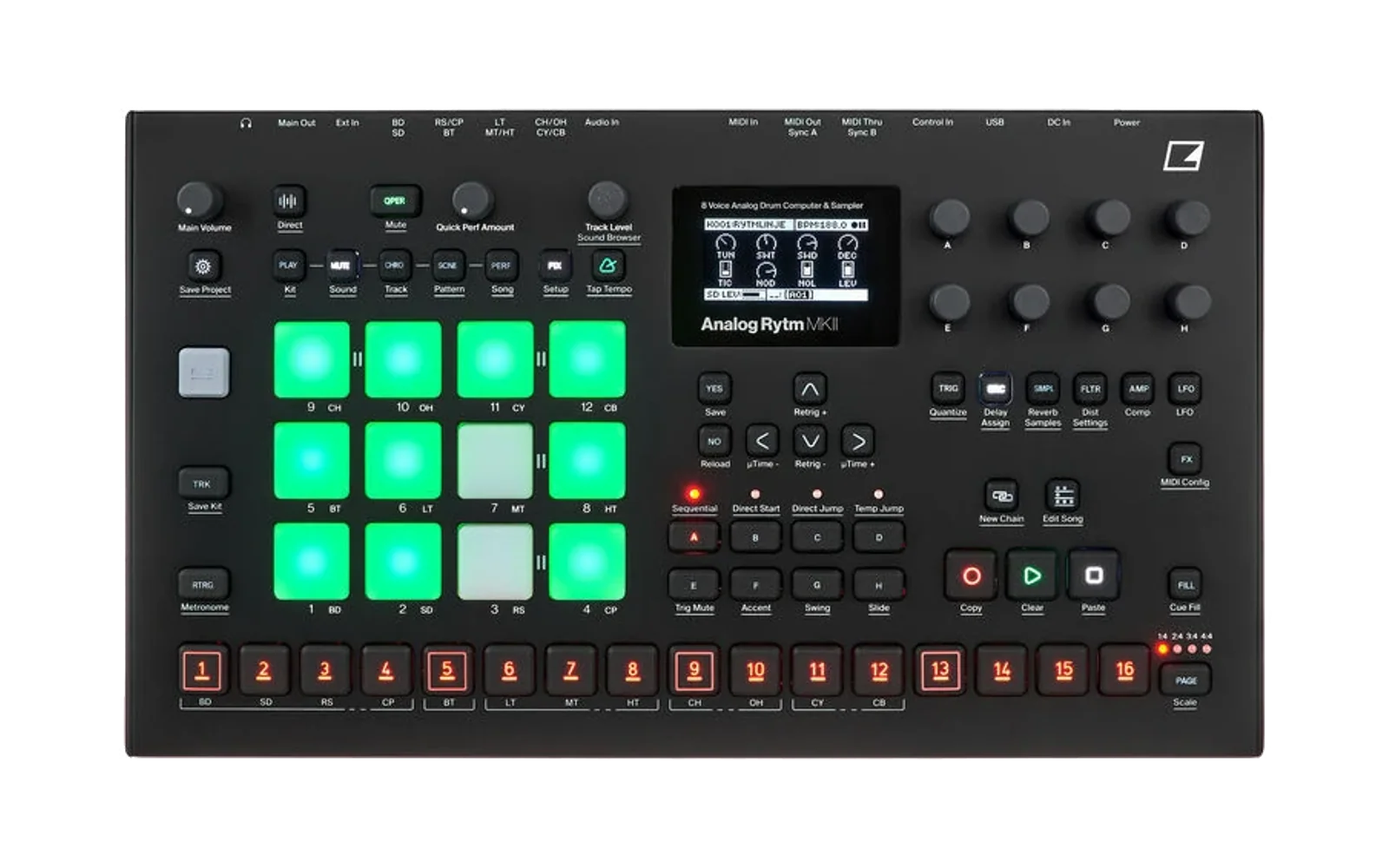
A diagnostics mod for the Elektron Analog Rytm MKII (OS 1.74) and Analog Four MKII (OS 1.56): irpina's digihealth for the Digitakt mk1, ported to the two analog machines. It adds two rows to SETTINGS:
- SYSTEM INFO shows CPU, DSP, RAM and (on the Rytm) free sample memory in
the top bar. A read-only USB diagnostics channel lets
tools/analogusb.pyread the same figures, and more, from a computer. - REMOTE KEYS (on at every power-on) lets
tools/analogusb.py keyspress the panel's buttons, andtools/analogusb.py turnturn its encoders, over USB: see Remote keys. Off, the unit refuses key commands and lets go of any key the computer holds; the diagnostics still answer.
digihealth's third row, FAST AUDIO, is not ported: see Why no FAST AUDIO.
It is an elekloader mod and needs the device's core: core-ar2 on the Rytm (built and checked with 0.4), core-a4 on the A4 (built and checked with 0.1). elekloader builds a custom OS file on your own machine, from your stock OS file and the mods you pick; nothing from Elektron is distributed.
Until 1.1 it was called rytmhealth and was for the Rytm only.
Status: passed on a unit on both machines (Rytm OS 1.74, A4 OS 1.56), and checked in the emulator and on the host (see How it was checked).
This repository holds no Elektron code or data: stock code sites are named by address, length and SHA-256, and their bytes, like the panel's button layout, come from your own stock file or your own unit.
SYSTEM INFO
- The top bar shows two pages, two seconds each:
- CPU and DSP load (DSP now, and its peak in the last second);
- free RAM (the heap), and on the Rytm free sample memory (the A4 has none).
- DSP is the ColdFire's audio interrupt: on the Rytm the sample voices, the effects and the mix; on the A4 the effects and the mix. The analog voices cost it nothing, so they are not in it.
- CPU is the share of time the processor is not idle.
- The USB channel is SysEx with Elektron's manufacturer header and a device byte (0x7D) that no Elektron machine uses, so a stock OS ignores it. Its diagnostics commands are read-only: HELLO, STATS (the once-a-second snapshot: render and idle time, the heap by block size, free sample memory) and PEEK (DDR and the SRAM only). The diagnostics protocol is digihealth's, byte for byte.
python tools/analogusb.py cfw          # which mod answers, and its uptime
python tools/analogusb.py stats 10     # ten readings, one a second
python tools/analogusb.py peek 0x47be0000 64   # the mods' RAM area
python tools/analogusb.py --port "Analog Four" stats   # with both units connected
analogusb.py runs on Windows (winmm, through ctypes; no packages) and on
macOS/Linux (Mido + python-rtmidi: pip install mido python-rtmidi). Close
Elektron Transfer and Overbridge apps first on Windows, which lets one
program at a time open a MIDI port. It looks for one MIDI input and output
whose name contains "Analog Rytm" or "Analog Four"; with both units connected,
--port NAME (before the command) picks one.
Remote keys
Every key of the panel: 78 on the Rytm (16 trig keys, 12 pads, 8 bank keys,
the encoder pushes and every other button), 89 on the A4 (the same kinds, the
track keys and the 13-key keyboard). Names are the OS's own (FUNC, TRK,
GLOBAL, PLAY, ...): see the button maps. The client
asks the unit which device it is and uses that device's names.
python tools/analogusb.py keys GLOBAL                     # open SETTINGS
python tools/analogusb.py keys 'FUNC(PLAY)'               # hold FUNC, tap PLAY
python tools/analogusb.py keys 'GLOBAL,DOWN,DOWN,YES'
A bare name taps that button; FUNC(PLAY) holds FUNC, taps PLAY, then
releases FUNC before the next step. Commas separate steps; quote the sequence
so the shell keeps the parentheses. --tap-ms defaults to 100 (maximum 250)
and --hold-ms to 2000 (maximum 2000); the hold is a safety lease, not a
delay. All names are checked before any key action, each step waits for
completion, and an error stops the sequence and lets go of every key.
Completion means the stock button driver took the transition, not that a
menu opened.
- Rytm pads: a pad name in
keysis the pad's key event only. To strike a pad, with its velocity, pressure and release as the panel sends them, useanalogusb.py pad(pads);padcaplogs what the panel sends andpadplaysends a logged performance again. - Encoders:
python tools/analogusb.py turn E -12turns encoder E 12 counts left, one count per UI tick (20 a second), as a panel turn does: the value popup and the header's long name appear as for a hand turn. The encoders are A-H and LEVEL on the Rytm, A-J and LEVEL on the A4. As on the panel, several counts make one value step (on a Rytm, 60 counts at 4 a tick moved FRQ 12 steps, and 20 counts at 2 a tick moved the track level 2), so a turn of a few counts may change nothing. The OS also drops the first counts of a turn after a pause, so a small turn out and the same turn back need not return to the start: in the emulator, panel turns of +10 and then -10 counts on the Rytm's SRC page moved SWT and left it there, as remote turns do on a unit.--step Nsends N counts a tick (faster, and the OS's acceleration applies);--hold FUNCholds a key through the turn. An encoder pushed within the last moment ignores turns, as on the panel. - Physical keys win: a key held on the panel cannot be taken by the computer, and a panel press of a key the computer holds survives the computer's release.
- Watching the panel:
python tools/analogusb.py watch 30prints keys as they go down and up for 30 seconds, andwatch --until FUNCwaits for a key. It reads the button state the OS keeps with PEEK about 20 times a second, so it needs nothing more from the firmware; it sees keys the computer holds too, and a tap shorter than one read can be missed.
Python callers can reuse any port with send, receive and close:
from analogusb import Diag, RemoteKeys  # tools/ on the import path

with RemoteKeys(Diag(port)) as keys:
    keys.press('FUNC')
    keys.tap('PLAY')
    keys.release('FUNC')
The protocol is digihealth's revision 2 with 128-bit key maps, because these machines have more keys than revision 2's 64-bit maps hold, and a TURN action for the encoders (revision 4). See the protocol reference.
Why no FAST AUDIO
digihealth's FAST AUDIO runs the Digitakt's audio code from a stretch of the processor's 64 KB on-chip SRAM that the Digitakt's OS leaves empty. The Rytm's OS fills and uses all of that SRAM itself, so there is no room to run code from without taking room the OS needs. The A4's OS also fills the whole SRAM from its image at boot; it has not been surveyed further.
Install
You need:
- elekloader with the device's core (see
elekloader); from source, build it
with
python -m elekloader.sdk.build mods/core-ar2 --stock Analog-Rytm_MKII_OS1.74.syxormods/core-a4 --stock Analog-Four_MKII_OS1.56.syx. - This mod, built from source (below).
- The stock OS file,
Analog-Rytm_MKII_OS1.74.syxorAnalog-Four_MKII_OS1.56.syx, from Elektron's downloads. elekloader recognises it by its hash.
python -m elekloader.patch --stock Analog-Rytm_MKII_OS1.74.syx \
    --mod core-0.4.elemod --mod out/analoghealth-1.3.elemod \
    --out Analog-Rytm_MKII_OS1.74-health.syx --version AH13
python -m elekloader.patch --stock Analog-Four_MKII_OS1.56.syx \
    --mod core-0.1.elemod --mod out/a4/analoghealth-1.2.elemod \
    --out Analog-Four_MKII_OS1.56-health.syx --version AH12
Flash it with Elektron Transfer, as for any OS update, and don't turn the unit off until the upgrade is done. Recovery: elekloader never changes the bootloader, so the stock OS file always restores the unit (hold FUNC while powering on for the startup menu, then OS UPGRADE).
Build it from source
The Digitakt mk1 cross toolchain (m68k binutils and gcc; on Debian or Ubuntu,
apt install binutils-m68k-linux-gnu gcc-m68k-linux-gnu; on Windows, inside
WSL) and elekloader, importable. The stock file picks the device:
python build.py --stock Analog-Rytm_MKII_OS1.74.syx     # -> out/analoghealth-1.3.elemod (Rytm)
python build.py --stock Analog-Four_MKII_OS1.56.syx --out out/a4   # (A4)
python -m elekloader.lint out/analoghealth-1.3.elemod --stock Analog-Rytm_MKII_OS1.74.syx --with core-0.4.elemod
| file | |
|---|---|
mod.json, a4/mod.json | the mod for each device: its sites (by address, length and SHA-256), handlers and resources |
build.py | picks the device's manifest, reads each site's stock bytes from your stock file, checks the hash, and calls elekloader's SDK |
sysinfo.s | the SYSTEM INFO and REMOTE KEYS rows, the readout, the render and idle timing, the USB channel |
ar174.inc, a4/a4156.inc | the stock routines and data it uses: Rytm OS 1.74, A4 OS 1.56 |
core_candidate.c, core_candidate.s, core_candidate.h | the physical/synthetic input bridge on the button driver, and the encoder input, private to this mod |
remote_keys.c, remote_keys.s, remote_keys.h | the bounded key mailbox, UI tick and clock |
remote_pads.c, remote_pads.s, remote_pads.h | Rytm only: the pad player and the panel log, on the panel's receive path (pads) |
tools/analogpads.py | pad scripts, the log's decoder and replay, the velocity mapping |
keys-ar2.def, keys-a4.def, tools/keymap.py | key names and their OS key codes; the firmware finds each key on the panel from the unit's own table |
tools/analogusb.py, tools/winmidi.py, tools/midimido.py | the diagnostics and key client, and its MIDI transports |
tools/analogrun.py, tools/elkrpc.py | the test runner and Elektron RPC client (host tools) |
standalone/ | analogremote: the remote keys alone, patched into a stock OS without a core, for tests that need remote input on otherwise stock firmware (see its README) |
tests/ | the host tests (tests/fixtures/remote_keys_host.c builds the C for either device) |
How the port was made
digihealth's stock routines, found again in each OS, with that OS's
addresses (ar174.inc, a4/a4156.inc). It hooks the same three places as
digihealth: the task switch (idle time), the SysEx input (the USB channel)
and the panel's button input (the remote keys). Encoder turns use the OS's
own encoder input, with no further hook. On the Rytm, a fourth site, the
entry of the panel's receive path, logs the panel's bytes and lets the pad
player wait until the panel is between messages.
How it was checked
- Build:
build.pyandelekloader.lintagainst stock Rytm 1.74 with core-ar2 0.4 and stock A4 1.56 with core-a4 0.1: no overlaps, stock bytes as expected, code sites whole instructions;elekloader.patchbuilds and verifies both OSes (AH12). - Host tests (
tests/, 44): the real C protocol and bridge, built for each device, behind a fake port with a synthetic panel table: capabilities, a hold and tap, every key found and reaching its place, a key missing from the unit's table not offered, the CLI sequence, physical overlap, a busy queue, the REMOTE KEYS row off, the hold lease, name checks, encoder turns, and the client's selftest; and the host tools' tests. WithELEKLOADER_STOCK(Rytm 1.74) andELEKLOADER_A4_STOCK(A4 1.56) set, it checks that each unit's table holds every key code in itskeys-*.def. - The Rytm in the emulator (trigcondition/analog-emu),
from a cold boot (rytmhealth 1.0 to 1.1):
- HELLO, STATS and CAPABILITIES sent on USB MIDI were answered: 1500 renders a second at 132.000 MHz, CPU 51 % and DSP 49 % at rest, 13.26 MB heap free, 64.00 MB sample memory free; 78 keys. The heap walk stopped one free list at a failed check, which digihealth also sees on a stock Digitakt (its README).
- Remote GLOBAL opened SETTINGS; eight remote DOWNs reached SYSTEM INFO, after SYSTEM; YES ticked it; NO closed the menu and the top bar showed "CPU 51% DSP 49%/49%", then "RAM 13.2M SMP 64.0M".
- A remote FLTR and then
turn E -6 --step 2showed FREQUENCY in the header and FRQ 121; a remote LEVEL turn showed TRK LEVEL 84. - A remote BD tap sent no MIDI note (a pad hit does).
- The emulator stands in for the OS's SysEx sending, so the unit is the check for the USB replies.
- The Rytm on a unit (OS 1.74):
- rytmhealth 1.0 (22 Oct 2026): every step of the hardware test passed:
the rows, the readout stopped and playing,
cfwandstatsover USB, remote GLOBAL, the SETTINGS sequence,FUNC(PLAY), PLAY and STOP; REMOTE KEYS off refuses keys while diagnostics answer; a panel-held FUNC is refused as an overlap; a remote pad is silent; normal playing is unchanged; after a power cycle SYSTEM INFO is off and REMOTE KEYS on. - With key positions from the unit's own table (23 Oct 2026): the same
remote keys, both rows and the readout in screen captures, and
watchsaw a held FUNC whilekeys 'FUNC(PLAY)'was refused as an overlap. - rytmhealth 1.1 (23 Oct 2026): on the FILTER page a remote
turn E -60 --step 4put FREQUENCY in the header and moved FRQ from 127 to 115, andturn E 60 --step 4brought it back;turn LEVEL -20 --step 2showed TRK LEVEL 98, and+20brought it back to 100.
- rytmhealth 1.0 (22 Oct 2026): every step of the hardware test passed:
the rows, the readout stopped and playing,
- The A4 in the emulator (the A4 build of rytm-emu, analoghealth 1.2,
from a cold boot): HELLO answered "analoghealth 1.2"; STATS: 1500 renders a
second at 132 MHz, CPU 49 % and DSP 48 % at rest, 13.80 MB heap free;
CAPABILITIES: product 4, OS 1.56, 89 keys (each found in the unit's table)
and 11 encoders. Remote GLOBAL opened SETTINGS, and SYSTEM INFO and REMOTE
KEYS sit after SYSTEM; remote DOWNs and YES ticked SYSTEM INFO, and the top
bar showed "CPU 49% DSP 48%/48%". A remote
turn A -40 --step 4on the OSC page showed COARSE TUNE in the header and the value -8, as an emulated panel turn does. The same build also went through the emulator's OS upgrade path: a stock A4 1.56 received it as elkflash sends it (no prompt), wrote its flash, restarted from it, and answered as above. - The A4 on a unit (OS 1.56, analoghealth 1.2, 23 Oct 2026, flashed with
elkflash): HELLO and STATS answered over USB (CPU 70 %, DSP 67 %, 13.77 MB
heap free, 132 MHz, 1500 renders a second); remote GLOBAL and eight DOWNs
reached SYSTEM INFO after SYSTEM; YES ticked it and the top bar showed
"CPU 73% DSP 67%/72%", then "RAM 13.7M"; a remote
turn LEVEL -20 --step 2moved the SETTINGS cursor up a row; NO closed the menu with the readout still on. With FUNC held on the panel,watchsaw it and a remote FUNC press was refused as a physical overlap; the panel's FUNC then came up normally. The unit then went back to stock 1.56.
Credits
- digihealth by irpina (GPL-2.0-or-later): this mod is its SYSTEM INFO and REMOTE KEYS, with the Rytm's and the A4's addresses; the protocol, the client and the input bridge are its.
- elekloader by irpina (GPL-2.0-or-later) and its core-ar2 and core-a4.
- analog-emu by trigcondition (MIT): the emulator the checks ran in.
Licence
GPL-2.0-or-later. analoghealth is free software: you can redistribute it and/or modify it under the terms of the GNU General Public License as published by the Free Software Foundation, either version 2 of the License, or (at your option) any later version. It is distributed in the hope that it will be useful, but WITHOUT ANY WARRANTY; without even the implied warranty of MERCHANTABILITY or FITNESS FOR A PARTICULAR PURPOSE. See the GNU General Public License for more details: LICENSE holds version 2.
Not affiliated with Elektron. Analog Rytm, Analog Four and Digitakt are trademarks of Elektron. Custom firmware is at your own risk.