akai_standalone_remap
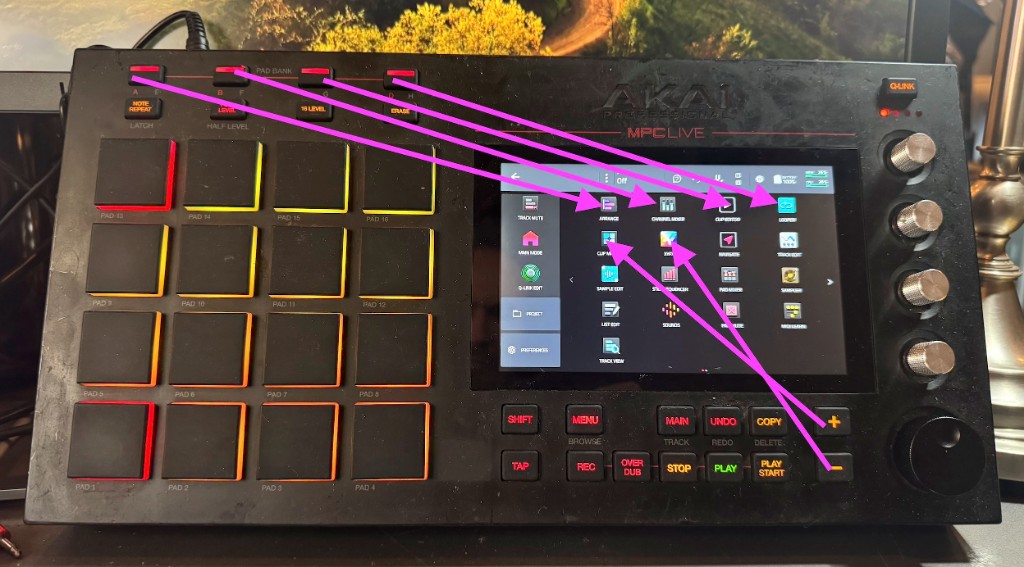
Remap the hardware buttons of standalone Akai MPC / Force devices: open any screen from any button, add double taps, long presses and Shift layers. Tested on a first-generation MPC Live (Hakai, MPC 3.9.1) and an Akai Force (stock firmware 3.9.0).
The devices have no setting for this, so hwremap.so is an LD_PRELOAD shim that sits between
the controller and the MPC/Force app. It rewrites the controller's MIDI stream: a press of a chosen
button is swallowed and replaced with other buttons, pads or a touchscreen tap. To the app this
looks exactly like you did it yourself.
The main trick on MPC: holding Menu and tapping a pad opens the icon in that cell of the 4×4 Mode Menu. So any button can open any screen: put the icon in the menu cell and map the button to "Menu + that pad".
Configs
| File | Device | What it does |
|---|---|---|
configs/mpc-live.conf | MPC Live | Pad Bank A–D open the top row of the Mode Menu; +, − and their double taps open the second row |
configs/force.conf | Force | Mixer ×2 = Master; Menu ×2 = Main Mode; Knobs: short = Shift + Knobs, long = Knobs, double = original long press |
Install one of them as /sdcard/hwremap.conf on the device.
MPC Live
| Button | Opens (Mode Menu cell) |
|---|---|
| Pad Bank A–D | top row, icons 1–4 |
+ | second row, icon 1 |
+ twice | second row, icon 3 |
− | second row, icon 2 |
− twice | second row, icon 4 |
Rearrange the icons in the Mode Menu to choose what each button opens; it applies right away.
Hold Shift for the original function (Shift + +/− changes values). Pad banks are not
reachable while the remap is on.
Force
| Button | Does |
|---|---|
| Mixer twice | Master (the first press opens the mixer as usual) |
| Menu twice | taps the Main Mode icon in the menu |
| Knobs short | Shift + Knobs |
| Knobs long | a plain Knobs press |
| Knobs twice | the original long press: Knobs held while you hold the button, at least 0.8 s |
| Shift + Knobs | plain Knobs |
The Main Mode tap uses screen coordinates from configs/force.conf. If the icon moves, record a
new tap (see "Touch coordinates").
How it works
- The shim hooks
snd_rawmidi_openandsnd_rawmidi_readand only touches the controller input port whose name contains "Private". Every other MIDI port passes through untouched. - Buttons arrive as notes on channel 1: press is
90 nn 7F, release is90 nn 00. Pads are notes on channel 10. The shim parses the stream properly, including running status, SysEx and realtime bytes, and replaces only the mapped button notes. - Injected releases use note-on with velocity 0, like the hardware does. The app ignores note-off for
buttons: a Menu "released" with
80 7B ..stays held, and then tapping an icon in the menu opens it instead of letting you drag it. - Long presses, delayed taps and minimum holds fire from timers, when no MIDI is arriving. The app
reads MIDI from a thread that waits in
poll(), so the shim also hookspoll(): it adds a wake pipe and reports the controller port readable while injected bytes are queued. - Touch taps are written to the touchscreen input device (
/dev/input/event0) as a multitouch down/up, the same events a finger produces. - The config is re-read whenever its modification time changes, so edits apply on the next button press.
Config reference
File: /sdcard/hwremap.conf. One rule per line; # starts a comment. Buttons are given by note
number, decimal or 0x hex.
log 1                    log every input byte to /tmp/hwremap.log (keep 0 normally)
hold 49                  while this button (Shift) is held, remapped buttons pass through...
held 1 u49 b1 d49        ...unless a "held" rule exists for them: then it runs instead

54 d123 p0x30 u123       on press of 54: Menu down, tap pad 0x30, Menu up
dbl 54 d123 p0x2D u123   second press within dblms runs this instead
dbl 11 b5                with no plain rule, the first press passes through unchanged

tap 1 d49 b1 u49         short press: runs on release
long 1 b1                held past longms: runs at the threshold
                         (without a long rule, the button itself goes through, held)
dbl 1 h1                 with a tap rule: a second press within dblms runs this; the short
                         press waits out the window so it does not fire first

dblms 350                double-tap window, ms
longms 400               long-press threshold, ms
holdms 800               minimum hold for hN, ms
touchms 150              delay before a touch tap, ms
Action tokens:
| Token | Meaning |
|---|---|
dN | button N down |
uN | button N up |
bN | button N tap (down + up) |
pN | pad tap, N is the pad note |
hN | hold button N down while the source button is held (at least holdms) |
tX,Y | touchscreen tap at raw touch coordinates X,Y |
xHH | raw MIDI byte |
mName | MPC: Menu + the pad under mode "Name" (underscores = spaces), looked up in MPC.settings |
With a plain rule plus a dbl rule, the first press still runs the plain action right away, so a
double tap briefly shows the first screen before the second one.
mName reads the Mode Menu layout from /media/az01-internal/Settings/MPC/MPC.settings. The app
writes that file only when it saves preferences or quits, so a moved icon is picked up only after
that. Only the 16 cells reachable with Menu + pad work (ModeMenuPage1Slot0..15). Fixed
d123 pN u123 rules do not have this delay.
Notes
MPC Live buttons (channel 1):
| Button | Note | Button | Note |
|---|---|---|---|
| Shift | 49 | + | 54 |
| Menu | 123 | − | 55 |
| Main | 52 | Pad Bank A | 35 |
| Next Seq | 42 | Pad Bank B | 36 |
| Pad Bank C | 37 | ||
| Pad Bank D | 38 |
MPC X buttons that MPC Live also accepts: XYFX 126, Channel Mixer 116, Pad Mixer 115.
MPC pads (channel 10), laid out like the hardware. With Menu held, each pad opens the icon in the same position of the Mode Menu:
pad 13: 0x31   pad 14: 0x37   pad 15: 0x33   pad 16: 0x35    <- menu row 1
pad  9: 0x30   pad 10: 0x2F   pad 11: 0x2D   pad 12: 0x2B    <- menu row 2
pad  5: 0x28   pad  6: 0x26   pad  7: 0x2E   pad  8: 0x2C    <- menu row 3
pad  1: 0x25   pad  2: 0x24   pad  3: 0x2A   pad  4: 0x52    <- menu row 4
Force buttons (channel 1): Navigate 0, Knobs 1, Menu 2, Matrix 3, Note 4, Master 5, Clip 9,
Mixer 11, Shift 49. More in TheKikGen's tables (tkgl_midimapper.h).
To find the note of any button, set log 1, press it, and read /tmp/hwremap.log.
Touch coordinates
Record a tap while touching the target on screen, then decode it:
ssh root@<device> 'cat /dev/input/event0 > /tmp/touch.bin'   # tap the target, then Ctrl-C
scp root@<device>:/tmp/touch.bin .
python3 -c "
import struct; d=open('touch.bin','rb').read()
for i in range(0,len(d)-15,16):
    s,us,t,c,v=struct.unpack('<IIHHi',d[i:i+16])
    if t==3 and c in (0x35,0x36): print('xy'[c-0x35], v)"
Build
Cross-compile for the device (armhf, glibc 2.39) and run the host tests (ASan/UBSan), both in Docker:
./build.sh          # -> hwremap.so
./build.sh test
Install
Over SSH as root. Config changes need no restart; a new hwremap.so needs an app restart
(systemctl restart acvs), which closes the open project.
MPC (Hakai)
The root filesystem is read-only, and BusyBox has no install.
scp hwremap.so root@<mpc>:/tmp/hwremap.so.new
scp configs/mpc-live.conf root@<mpc>:/sdcard/hwremap.conf.new

ssh root@<mpc>
mv /sdcard/hwremap.conf.new /sdcard/hwremap.conf
systemctl stop acvs
mount -o remount,rw /
cp /tmp/hwremap.so.new /usr/lib/hwremap.so.new && chmod 755 /usr/lib/hwremap.so.new
mv /usr/lib/hwremap.so.new /usr/lib/hwremap.so
First install only: append /usr/lib/hwremap.so to every LD_PRELOAD line of the launcher,
keeping a backup:
cp /usr/bin/az01-launch-MPC /usr/bin/az01-launch-MPC.orig-hwremap
sed -i 's#customBufferSizeMPC.so \$CURSOR_SO#customBufferSizeMPC.so /usr/lib/hwremap.so $CURSOR_SO#' /usr/bin/az01-launch-MPC
grep LD_PRELOAD /usr/bin/az01-launch-MPC
Then:
sync; mount -o remount,ro /
systemctl start acvs
grep -c hwremap /proc/$(pidof MPC)/maps  # non-zero = loaded
Force (stock firmware)
No root filesystem changes: the library lives in /data and a systemd drop-in adds it to the app's
LD_PRELOAD (/etc is a writable overlay). Keep whatever acvs.service already preloads; on the
tested Force that is /usr/lib/libforce_cursor.so
(check with systemctl show acvs -p Environment).
scp hwremap.so root@<force>:/tmp/hwremap.so.new
scp configs/force.conf root@<force>:/sdcard/hwremap.conf.new

ssh root@<force>
mkdir -p /data/hwremap /etc/systemd/system/acvs.service.d
mv /tmp/hwremap.so.new /data/hwremap/hwremap.so && chmod 755 /data/hwremap/hwremap.so
mv /sdcard/hwremap.conf.new /sdcard/hwremap.conf
printf '[Service]\nEnvironment="LD_PRELOAD=/usr/lib/libforce_cursor.so /data/hwremap/hwremap.so"\n' \
  > /etc/systemd/system/acvs.service.d/hwremap.conf
systemctl daemon-reload
systemctl restart acvs
grep -c hwremap /proc/$(pidof MPC)/maps  # non-zero = loaded
Uninstall
MPC:
systemctl stop acvs
mount -o remount,rw /
cp /usr/bin/az01-launch-MPC.orig-hwremap /usr/bin/az01-launch-MPC
rm /usr/lib/hwremap.so
sync; mount -o remount,ro /
systemctl start acvs
Force:
rm /etc/systemd/system/acvs.service.d/hwremap.conf
systemctl daemon-reload
systemctl restart acvs
rm -r /data/hwremap
To disable remapping without uninstalling, empty /sdcard/hwremap.conf: with no rules the shim
passes everything through.
Limitations
- On MPC Live no MIDI note opens Clip Matrix or Clip Editor directly. Newer-model buttons like Matrix are not accepted by its firmware, so those screens are reached through the Mode Menu.
- On MPC Live, injected Shift + Next Seq opened Next Sequence rather than the Shift function. On
Force, injected Shift + Knobs is used by
configs/force.conf. - Nothing tells the shim which screen is showing, so a mapping cannot toggle between two screens.
- Touch taps use fixed coordinates; they break if the target moves on screen.
- The Lua
--scriptoption does nothing in the release MPC build.