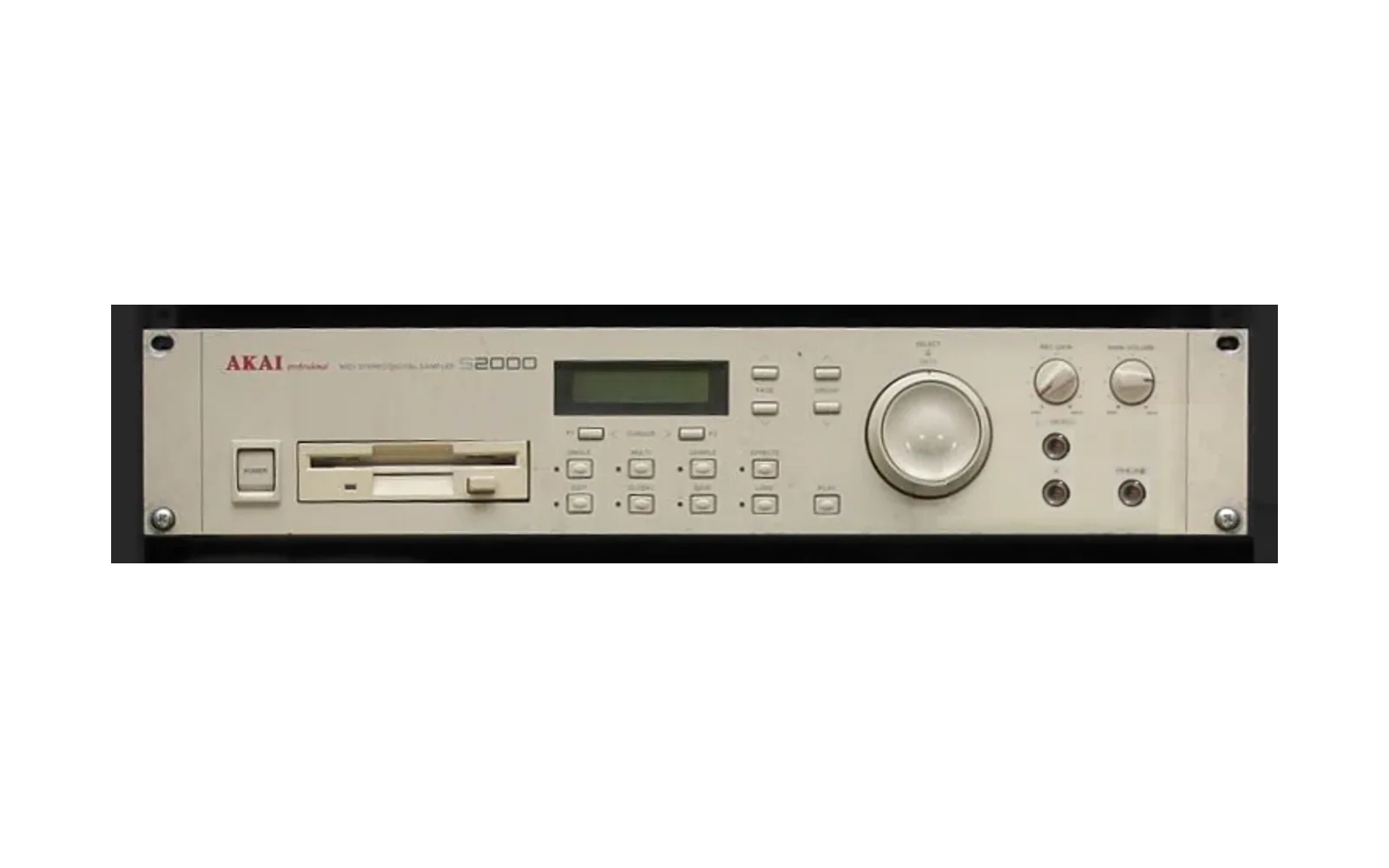


Akai S2000 Rosetta OS (WIP)
New tricks for the Akai S2000 sampler. Rosetta OS is a patch kit for the stock OS 2.0: you build a boot floppy image from your own S2000 OS disk and boot it from a Gotek (FlashFloppy). It unlocks the voice chip's hidden delay engine as effects with their own EFFECTS page (no EB16 effects board needed), puts the live input through them, including a tempo-synced live reverse delay with its own menu, adds an MPC-style home screen and menus, one-button sampling, and a synth layer (analog drift, detune, filter LFO on MIDI CCs). It also gives the S2000 64 KB of room for new code, loaded from the boot floppy after boot, so there's space to build much more. Nothing touches ROM or flash: boot your stock disk and it's an S2000 again.
Made by JunkSmithWizard (JSW) together with Claude (Anthropic's AI). Claude wrote the code and did the reverse engineering: NEC V53 disassembly, a whole-OS emulator, and the hidden delay engine measured over MIDI. JSW ran every build on a real S2000, built the measurement rig, and made the calls by ear. Same family as the GP-16 Rosetta OS, which the boot dragon comes from. Questions, hardware reports and ideas: Discord.
Demo
Listen: rosetta_fx_demo.mp3 (0:58, recorded from a real S2000 running Rosetta 0.10)
⚠ AUDIO WARNING: turn your volume down first. The test sounds are harsh: noise bursts and a 1 kHz beep.
- 0:00: noise burst, 3 hits per effect (~5 s each): OFF, ROOM, HALL, PLATE, ECHO, PINGPONG, CHORUS, FLANGER.
- 0:42: 1 kHz beep: OFF, CHORUS, FLANGER.
What it adds
| Feature | Status |
|---|---|
| Rosetta FX: ROOM, HALL, PLATE, ECHO, PINGPONG, CHORUS, FLANGER on the voice chip's own delay engine | ✅ on hardware (0.10) |
| SP-404 style FX (0.27): JUNO (the Juno-60 chorus: one swept line, R = inverted wet), TAPE (echo with wow, each repeat darker), DUB (long dark echo, -5 dB at 10 kHz per repeat), RESO (comb resonator, C3 at T100, TIME = pitch, FB = ring) | DUB / RESO ✅ on hardware; JUNO / TAPE (and CHORUS / FLANGER) crackle on held chords: see Walls (0.27) |
| Reverse delay on played notes: REVERSE and REV HALL (the hall's tail flipped) | ✅ on hardware (0.22) |
EFFECTS page: >HALL >WET 50 / >T100 >F100 >R100 (type, wet, time/size, feedback, LFO rate) | ✅ on hardware |
| MFX = input FX: EFFECTS on the sampling screen opens the same page for the live input (WET becomes IN) | ✅ on hardware (0.24) |
| LIVE REVERSE on the input, with its own menu: BPM + note division or length in ms, feedback, attack, release, chunk leveling, loop start/end inside the chunk, octave up/down, tone, ping-pong, dry level | ✅ on hardware (0.24) |
| SAV: the REV menu's knobs (plus FB and IN) saved to the boot floppy, back after a power cycle. FB is remembered per REV type | ✅ on hardware (0.25) |
| COMP gate: chunks quieter than -18 dB get less boost, none in silence, so hiss between notes is cut instead of pumped up | emulator ✅ (0.25) |
| ROSETTA ROM, a tiny synth rompler: 5 band-limited waves (saw, square, pulse, triangle, sine) in 5 key ranges + 9 synth programs (SAW, SQUARE, PULSE, TRI, SINE, SUPERSAW, BASS, PAD, PLUCK) on the boot floppy. The S2000 loads them with the OS: programs 1-9 at power-on, no disk needed. Each loop is stored with the wave on both sides of it (see Walls) | ✅ on hardware (0.27: clean loops) |
SYNTH page (MULTI): a mode menu (< ANALOG > GO, FAKE FM and WAVETABLE next), then 4 pages of knobs on the current program, every keygroup at once: WAVE (ROSETTA ROM programs), cutoff, resonance, key track, amp ADSR, filter env amount + attack / decay / sustain / release, drift, detune, filter LFO. Works on any program | emulator ✅ (0.26) |
| The rocker (the big knob's outer ring) on Rosetta pages: half push = next / previous knob, full push = a jump (a page, or 5 menu entries, like stock lists) | emulator ✅ (0.25) |
HOME hub: main screen line 2 = LOAD HALL EDIT, F1 / F2 under the screen jump to LOAD and EDIT | ✅ on hardware |
| Back one level: SINGLE (the home key) steps back (page → top of the mode → HOME) instead of always jumping home | ✅ on hardware |
| Area menus: EDIT PROGRAM (8 groups), EDIT SAMPLE (6) and GLOBAL (4) open a menu, essentials first. PAGE stays inside the group, GROUP jumps to the next one | EDIT PROGRAM ✅ on hardware (0.13), the rest emulator ✅ |
Sampling screen: REC opens on the input meter with SETUP ARM (stock hides it behind GROUP); a finished take lands on the sample select page | ✅ on hardware (0.16) |
| REC = start/stop: armed, hold REC to record while held, or tap to start and tap again to stop | ✅ on hardware (0.21) |
| +64 KB code space: the boot ROM only loads 256 KB, so Rosetta reads its extra code from the boot floppy into unused CPU RAM (0x40000) right after boot | ✅ on hardware (0.19) |
| SYNTH on MIDI CC 20-25: per-voice analog drift, detune spread, filter LFO with phase spread. All 0 = exactly stock | ✅ on hardware, measured over MIDI + audio (0.21) |
| Hot reload: send a new build of the extra code into a running S2000 over MIDI (no reboot, no floppy) | ✅ on hardware |
| PLAY always plays: with no program active, PLAY and MIDI notes audition the current sample | ✅ on hardware |
| LOAD / SAVE in one press: skips "DISK or FLASHROM" when no flash ROM is fitted | ✅ on hardware |
| Faster data-key repeat | ✅ on hardware |
| Boot dragon: the GP-16 Rosetta animation on the LCD | ✅ on hardware |
| FX lab: poke/peek memory and the sound chip live from a PC over MIDI SysEx | ✅ on hardware |
The hidden delay engine
The S2000's voice chip (L7A1045) has a delay engine built in: one 65,536-sample line (~1.49 s at 44.1 kHz) and 30 taps. Each tap has its own gain and a route: left out, right out, or back into the line (feedback). The stock OS barely uses it: one preset for recording, plus a reverb-like preset that is never called.
We mapped it from a PC: Rosetta's SysEx backdoor writes taps, the PC fires a noise burst over MIDI and records
the outputs, and deconvolution shows every tap (tools/irmeasure.py). Delays land within 1 sample of the table.
Then:
- Reverbs are multi-tap feedback loops designed offline in a Python model of the engine (
tools/fxdesign.py), with exact Q15 gains (the OS's own 8-bit levels halve the decay). - Chorus / flanger sweep tap delays from an LFO every tick (0.51 ms). Two neighbouring taps crossfade for fractional delays, so the sweep is smooth with no clicks.
- ECHO / PINGPONG are plain taps plus feedback (375 ms echo, 300/600 ms ping-pong).
One delay line means no series allpasses, so the reverbs have a metallic, digital character. Cool, but there's room to grow (modulated feedback taps are next).
Reverse needs more than taps: on notes, Rosetta copies chunks of the delay line out to sample RAM, flips them, and plays them on spare voices. On the live input it goes further: the chip's own input DMA is pointed at a ring buffer Rosetta fills, in stereo mode. The left channel is your input (the dry monitor). The right one is the previous chunk of the input backwards, played on its own voice with its own envelope, volume, filter and send.
Using it
Panel names: F1 / F2 = the two buttons under the screen, SINGLE = the home key, SAMPLE = REC.
- EFFECTS: the first press opens the FX page; pressing it again picks the next effect.
F1 / F2 move the
>; the DATA wheel and the PAGE/GROUP keys change the value. - MFX (input FX): on the sampling screen (SAMPLE), press EFFECTS. Same page, but WET is IN: how much of the input goes into the effect. EFFECTS again = next type, SINGLE = back to the meter. You hear it live; the take still records dry. One delay engine, so the type, time and feedback are shared with the notes' FX page.
- Live reverse: pick REVERSE or REV HALL on the MFX page and turn IN up. The page becomes the REV menu: PAGE ▲▼ = page, F1 / F2 = knob, wheel or GROUP ▲▼ = value. The rocker walks the knobs straight through all four pages (full push = a whole page).
| Page | Knobs |
|---|---|
| 1 | TYPE · IN (wet: 50 = as loud as the dry, 99 = full) · DIV (1/16, 1/8, dotted 1/8, 1/4, dotted 1/4), or LEN in ms when BPM is FREE · BPM (40-240, below 40 = FREE) |
| 2 | FB feedback (repeats come back reversed again) · ATK / REL (each chunk swells in / fades out) · CMP (chunk leveling: quiet chunks up, loud ones down, no clipping; below -18 dB it gates instead, so hiss isn't pumped up) |
| 3 | STR / END (a loop inside the reversed chunk, like a sample's loop points: stutters) · OCT (-1 / 0 / +1) · TON (dark to open) |
| 4 | PNG ping-pong (chunks alternate left / right) · DRY (the input's own level) · SWL (soft chunk edges) · SAV (turn the wheel once: ... then OK; up to ~5 s while the floppy spins up) |
SAV writes one 1 KB block of the boot floppy (inside the OS file, so the OS's own SAVE never touches it); the
knobs come back at the next boot. It only writes when you ask. tools/stick.py carries saved knobs over when a
new build goes on the stick.
Long chunks and octave up store the input at 22 or 11 kHz, so the reversed copy gets darker (the dry never does). While live reverse runs, the monitor is ~12 ms late (stock: ~3 ms).
- ROSETTA ROM: right after boot, turn the DATA wheel on the main screen to pick program 1-9 (RS SAW ... RS PLUCK) and play. SUPERSAW and PAD stack 3 detuned voices per note, BASS 2. The SYNTH CCs below (drift, detune, filter LFO) turn them into a moving analog-style synth.
- SYNTH (the MULTI key; stock multi mode is not used):
SYN <program>/< ANALOG > GO. The wheel or rocker picks the mode, F2 = GO. Then 4 pages like the REV menu (F1 / F2 or the rocker = knob, wheel = value, PAGE = page, home = back to the mode menu, home again = HOME):
| Page | Knobs |
|---|---|
| 1 | WAV (saw, square, pulse, tri, sine: ROSETTA ROM programs) · CUT · RES · KEY (filter key track) |
| 2 | ATK · DEC · SUS · REL (amp envelope) |
| 3 | FEN (filter env amount; routes FILTER MOD 3 to ENV2) · F.AT · F.DC · F.SU |
| 4 | F.RL · DRF (drift) · DET (detune spread) · LFO (filter LFO) |
Edits go to every keygroup of the selected program number; save the program with the stock SAVE to keep them.
- HOME (main screen): line 2 shows
LOAD <effect> EDIT. Left button under the screen = LOAD, right button = EDIT program. - Menus: EDIT (program), REC → EDIT (sample) and TUNE (global) open a menu like
EDIT PROGRAM 1/8/>SAMPLES+ZONES. DATA wheel or PAGE picks a group, the right button goes in, the left button goes out. Inside a group, PAGE loops through that group's pages and GROUP jumps to the next group. - REC: opens on the input meter. Right button = ARM: the take starts when the sound passes the threshold, or press GO (left button) or REC to start now. REC = start/stop: hold it and the take stops when you let go; tap it and the take runs until you tap again (mono; the sample is cut to what was recorded, up to the SETUP length). Left button = SETUP (name, length, mono/stereo, pitch, threshold); home = back to the meter. After the take you land on the sample select page.
- Home key: back one level (page → menu → HOME).
- PLAY: auditions the current sample when no program is loaded.
- SYNTH (any MIDI channel, all 0 = stock): the boot screen says
ROSETTA+ READY / SYNTH CC 20-25when the extra code is in.
| CC | Does |
|---|---|
| 20 | DRIFT: each voice wanders in pitch like an old analog synth, up to ±20 cents |
| 21 | DRIFT SPEED: lazy (~2 s) to nervous (~0.25 s) |
| 22 | DETUNE: fixed per-voice detune spread, up to ±25 cents. Voices rotate, so every note is a bit different |
| 23 | FILTER LFO: how far the cutoff dips below where the program sets it, and comes back |
| 24 | LFO RATE: 0.03 to 10 Hz |
| 25 | LFO SPREAD: 0 = all voices together, 127 = every voice on its own phase (moving pads) |
Quick start (build your own disk)
You need: your own S2000 OS 2.0 floppy as a Teledisk .td0 or raw 1.6 MB image, Python 3.10+ with numpy,
NASM on PATH (or $NASM), a Gotek with FlashFloppy, and one HFE template
of an Akai HD floppy (e.g. your stock OS disk converted with the HxC Floppy Emulator software; every sector
is overwritten, only its track layout is used).
python tools/td0.py s2kos2.td0 build/s2kos2.img
python -I tools/mkbaby.py build/s2kos2.img template.hfe build/S2K_ROSETTA
- Copy
build/S2K_ROSETTA.hfeto the Gotek's USB stick asDSKA0000.hfe, withFF.CFGset tonav-mode = indexed. Keep one image on the stick. To update a stick that has saved knobs on it, usepython -I tools/stick.py build/S2K_ROSETTA <drive>instead: it keeps them. - Boot the S2000 from the Gotek. The dragon flies, then the HOME screen.
- The disk also carries a small test kit (CLICK, NOISE BURST, BEEP 1K) to LOAD from the same floppy.
It's built with the akaitool package from AKAI-CD-ISO-MAKER
(clone it next to this repo or set
$AKAITOOL), or setTESTKIT=0to leave it out. The ROSETTA ROM synth waves and programs (tools/rompler.py, 30 KB) go on too;ROMPLER=0leaves them out.
Every patch checks the stock bytes first, so a wrong OS image fails loudly instead of building junk.
Build your own features (the extra 64 KB)
The menu code (src/rosetta_menu.asm and friends, 5.6 KB) is full, so new features go in the hi code:
src/rosetta_load.asm(285 B, in free space before the dragon) reads the hi blob from the blocks right after the OS file on the boot floppy, on the first main-loop tick, through the OS's own raw floppy read (1F50:00BB). It checks theRSHImagic, then calls the blob's tick on every main-loop tick. Popups: LOADING / READY / FAILED.src/rosetta_hi.asmhooks the OS at run time from a patch table (segment, offset, stock bytes, new bytes); every stock byte is checked first, so nothing points at the hi code unless it really loaded. The OS calls fixed slots in the blob's header, so a new build can be sent in live:py -3.10 tools/hiload.py(SysEx, ~2 s).- Hooks used so far: pitch (
2345:5611, semitone × 256 before the exp table, so cents add linearly), filter target (2345:59CD, log 0-FFF, the chip glides to it every ~15 ms), MIDI CC (2B9D:01AE). The note-on path, voice table and chip registers are indocs/FINDINGS.md; ideas indocs/ideas.md. - Timing: the OS tick
[73DA]is 0.511 ms on hardware (1957 Hz). - The live input path, the DMA channels and the voice-chip registers as used (incl. two traps: a 0 written to the
volume register keys the voice off, and big envelope steps never move) are in
docs/FINDINGS.md. tools/lrsim.pyruns the live-reverse engine's real machine code in unicorn against a simulated ADC ring and DMA pointers and checks every mode against numpy. It caught three bugs before they reached hardware.- The emulator can run the whole thing:
s2k_ui.pyuses the build's.imgas the floppy (S2K_DISK,S2K_DISK_ATto insert it after the OS's boot-time disk read so notes play).
Also in the box
tools/s2kfx.py: the PC side of the FX lab (SysExF0 7D 53 ...):ping,peek,poke,outw,sel(pick an effect),load(tap tables),note,rec.tools/irmeasure.pyandtools/demo.pymeasure and record.tools/hiload.pyhot-loads the hi code.tools/s2k_emu.py+tools/s2k_ui.py: a unicorn emulator that boots the real OS to the main screen and presses keys (seq,fxcheck,pagewalk,isrcheck, ...). Needsunicornandcapstone.tools/x86dis.py,tools/sweep.py: V53 disassembly helpers (code map, port map, xrefs).tools/td0.py,tools/hfe.py: Teledisk and HFE converters (HFE overlay with CRC check on read-back).tools/stick.py: writes a build to the Gotek stick (checks forFF.CFG), keeping the knobs saved on it.docs/FINDINGS.md: the lab notebook (hardware map, code map, sound engine, build history).docs/menu_design.md: the menu redesign plan.docs/pagewalk.txt,docs/ui_tree.txt: stock UI maps.
Walls we hit
Notes for anyone hacking an S2000 / S3000-family sampler (L7A1045 voice chip, V53 CPU). Details in docs/FINDINGS.md.
- The boot ROM loads only 256 KB of OS. No room left for big features. Way round: a tiny loader in the OS reads more code from the boot floppy into CPU RAM the OS never uses (0x40000-0x4FFFF), after boot.
- There's no FX chip without the EB16 board, but the voice chip has a delay engine (one 1.49 s line, 30 taps) that the stock OS barely uses. We mapped it from a PC: SysEx backdoor + noise burst + deconvolution.
- One delay line = no series allpasses. The reverbs are multi-tap and sound metallic. Real smooth reverbs need a DSP board in the EB16 slot (hw/smart_eb).
- The filter is fixed: one resonant low-pass per voice, no hidden modes. We poked every filter register on hw: the undocumented second bank (ports E0h-E4h) changes nothing, and reg 6 word 2 is the filter's internal state (writing it = loud stuck rumble). Filter "flavours" can only be movement (curves, envelopes); real character means analog filters on the 8 individual outs (hw/ib208_clone).
- Loops need the wave on both sides. The interpolator reads 6-9 samples past a loop end and a few before the loop start after the jump. A single-cycle loop with other data around it in sample RAM clicks every loop (our rompler "crackled"). Store some of the wave before and after the loop.
- Moving delay taps crackle (OPEN). Chorus-type FX crossfade two taps between neighbouring delays. Same-value writes, small gain steps and 1-2 sample moves are clean one by one, yet the running LFO clicks on held chords. Writing a pair's lengths first and both gains back to back halved it. Hunt plan: docs/crackle_hunt.md.
- The CPU is slow for audio. A per-sample loop over 44.1 kHz eats ~80 % of the V53. Live reverse moves chunks with string instructions instead (~40 %) and has ~12 ms latency; no multiplies per sample.
- Sample-RAM DMA disturbs the even voices (it rewrites their start-address high bits). Rosetta plays its own voices on odd numbers.
- Writing the floppy: the OS has a raw sector read; flipping two immediates (DMA mode, FDC command) for one call turns it into a write. That's how SAV keeps knobs on the boot floppy.
- Lab hygiene: a SysEx poke into RAM must use addresses from the build that's running. A poke from an older build's symbol map hung the sampler once.
Status: work in progress 🚧
It boots, and the FX, menus, sampling and synth layer work on a real S2000. Expect rough edges.
Known issue: the moving FX (CHORUS, FLANGER, JUNO, TAPE) crackle on held chords (Walls). The static ones (ROOM, HALL, PLATE, ECHO, PINGPONG, DUB, RESO) are clean.
Planned:
- SYNTH page modes: FAKE FM and WAVETABLE (move a voice's loop through a table); unison.
- A SAMPLE menu: LOOPER, MPC and KEYBOARD modes.
- Live reverse: follow MIDI clock, a lower-latency fill from the timer interrupt.
- Freeze / resonator / shimmer effects, tempo-synced echo, denser and modulated reverbs.
- Quick jobs (load → audition → assign in a couple of presses), stereo hold-to-record.
Ideas, bug reports and test results are very welcome: open an issue or come to the Rosetta Discord.
Legal
Not affiliated with or endorsed by Akai Professional or inMusic. "Akai" and "S2000" are trademarks of their owners. This repo contains no Akai code or data: you build from your own OS 2.0 disk, and the test-kit sounds are synthesized. Build at your own risk; always keep your stock OS disk.
License: MIT (see LICENSE).
Thanks for enjoying, and God bless you! — JSW