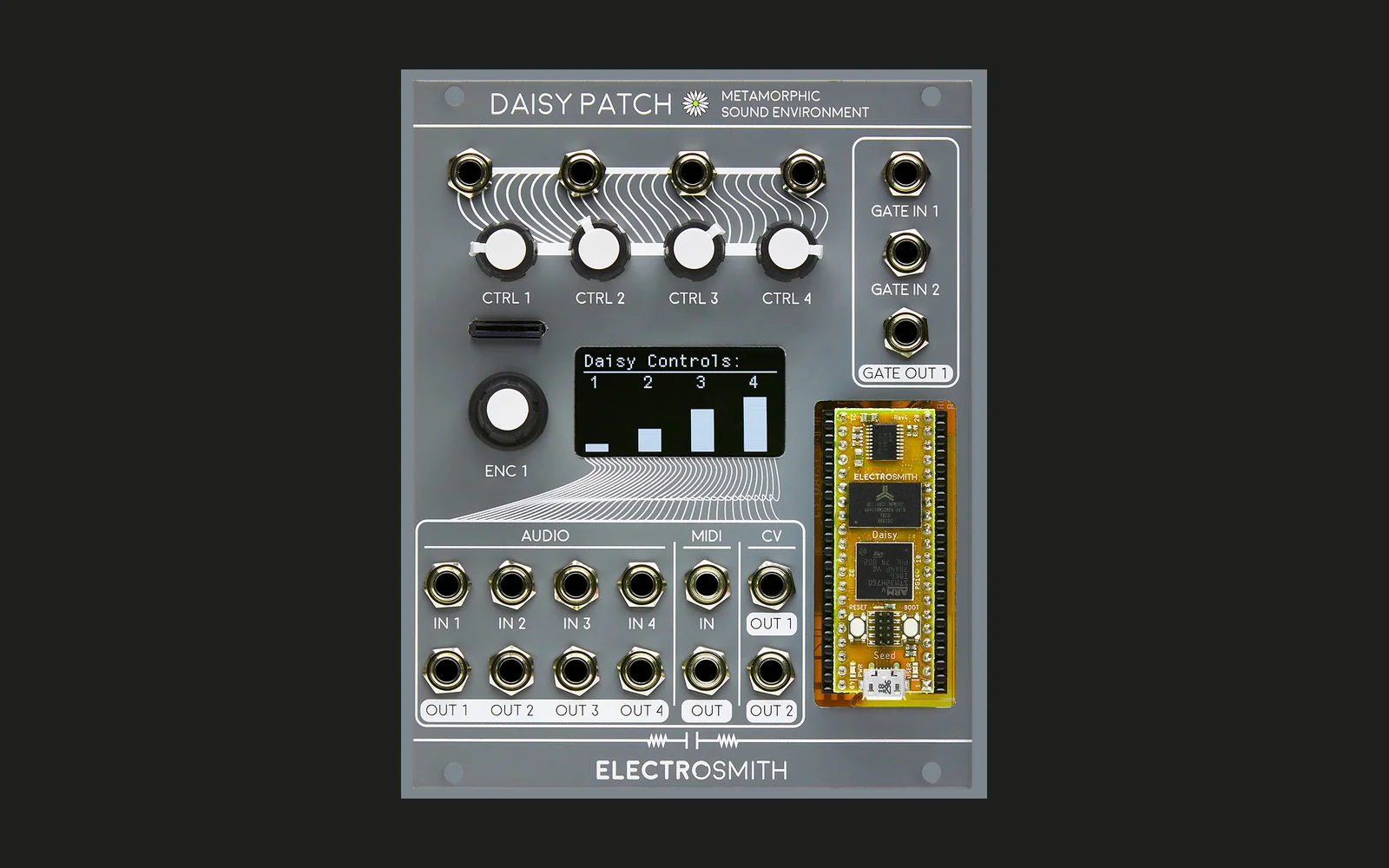
Description
Additive synthesis voice
Controls
| Control | Description | Comment |
|---|---|---|
| Ctrl1 | Fundamental | 1V/Oct Fundamental pitch |
| Ctrl2 | Stretch | 1V/Oct Partial/harmonic multiplier of the fundamental. It's expressed as linear voltage, so an increment of one octave results in an increment of 1 of the multiplier, resulting in an harmonic outcome. |
| Ctrl3 | Constant | Constant amount that is multiplied by the partial's integer index and added to the partial base frequency |
| Ctrl4 | Partials amplitude control | When the amplitude scheme is filter-like, acts like a cutoff |
| Audio In1 | LFO or audio-rate frequency modulation input | This input is not DC-coupled, so patching constant voltages will not work. Anyways, it's possible to add LFOs or even audio rate modulation to it. The input voltage follows the 1V/Octave convention, so an LFO that peaks at +1V and -1V will make the frequencies of all the partials shift of one octave higher and one lower |
| Audio In4 | Phase spread for sync | When Gate In1 is being triggered, the phase of all the partials is being reset to a certain phase. When the sampled input is 0, then all phases are zero; with larger inputs the phase spread among the partials is getting larger. This means that the first partial will always be reset with phase 0 and the last partial is going to have the largest phase value. To exemplify, this is the calculation of the last partial: the input value is divided by 5 and multiplied by 2*pi (hence voltages from 0 to 5V represent the entire circle). All the partials between the first and the last will have intermediate phase values that are also proportional to the partial index. This means that the new phase of the partial with index p is calculated as in4*(2*pi)*p/(5*maxp) |
| Gate In1 | Sync | Send triggers to this input to reset the phase of all the partials. The phase is configured from Audio input 4 |
| Audio Out1 | Main output | All the partials |
| Audio Out2 | Fundamental | Just the fundamental wave |
| Audio Out3 | Last partial | Just the last partial |
| Audio Out4 | Without fundamental | All the partials without the first one |
| Encoder Push | Next parameter | Round-robin selection of the additional parameters |
| Encoder Turn | Alter parameter | Changes the currently selected additional parameter |
Additional Parameters
Besides the 4 controls described above, there are a number of paramters that can be accessed via the "menu" implemented by pushing the encoder. By pushing the encoder the next additional parameter will be selected, and by rotating the encoder the parameter value can be changed:
| Additional parameter | Description | |
|---|---|---|
| P | number of partials. Its maximum value is 40 for Sine and the Poly* waveforms, 80 for all other waveforms | |
| Amp | amplitude scheme that determines the amplitude of the partials. Some of the algorithms (such as LP, BP, HP) mimic a filter | |
| Mld | mildness of the slope of the amplitude scheme. It's the number of partials that are part of the partials amplitude ramp. For filter-like amplitude schemes, as the mildness is set as smaller values, the cutpoints become more drastic. | |
| W | waveform of the partial (see dedicated section) | |
| Poly | not implemented yet |
Amplitude schemes
The following algorithms to determine the amplitude of each partial are available:
| On screen | What is it | Description |
|---|---|---|
| RE | Reciprocal | if the CTRL4 knob is turned completely left, then the amplitude of each partial is 1/i where i is the partial index. When the CTRL4 knob on turned completely to the right then the order of the amplitudes is reversed. Every position in the middle is a weighted average of the two situations. |
| LP | Low pass | Similar to a low pass filter, it assigns high amplitudes only to the lower partials |
| BP | Band pass | Only a window centered on the CTRL4 knob position has high amplitude values |
| HP | High pass | Analogous to LP, but for the higher partials |
| N | Notch | Is the opposite of BP: only a selection of partials centered on the CTRL4 knob position have low or mute amplitudes, the others have high amplitude |
| CN | Normal comb | Various notches equally spaced that can be shifted with the CTRL4 knob |
| CD | Different comb | Similar to C1 but the frequency represented by how many notches are there gets higher as the partial index get higher |
The slopes of LP, HP, BP, N, C1 and C2 are linear: in LP it's just a straight line making a triangle with width set with the Mld parameter of amplitudes from 100% of the CTRL4 point to 0% of CTRL4+Mld. With HP it’s the opposite, a triangle that goes from 0% to 100%, while with BP it’s from 100% to 0% at the cutoff point and then back with another triangle to 100%. The same geometry applies to the shape of the notch (N) and the various notches in the comb modes (C1 and C2).
On the screen the last line will illustrate graphically the configuration of the amplitudes of the first 30 partials.
Possible waveforms
The waveforms that one can choose are the ones that are implemented in the DaisySP library and are:
| On screen | What is it | |
|---|---|---|
| Sin | Sine | |
| Tri | Triangular | |
| Saw | Sawtooth | |
| Rmp | Ramp | |
| Sqr | Square | |
| PTr | Polyblep Triangular | |
| PSw | Polyblep Sawtooth | |
| PSq | Polyblep Square |
How to install this firmware in the daisy patch
A pre-compiled binary firmware additive_voice_latest.bin is available in the sub-directory build/ : https://github.com/stablum/AdditiveVoice/blob/master/build/additive_voice_latest.bin
Please use the tool at the page https://electro-smith.github.io/Programmer/ to write the binary firmware to the daisy patch.
Author
Francesco 'Frablum' Stablum
License
Copyright (C) 2020 Francesco 'Frablum' Stablum

This program is free software: you can redistribute it and/or modify
it under the terms of the GNU General Public License as published by
the Free Software Foundation, either version 3 of the License, or
(at your option) any later version.

This program is distributed in the hope that it will be useful,
but WITHOUT ANY WARRANTY; without even the implied warranty of
MERCHANTABILITY or FITNESS FOR A PARTICULAR PURPOSE.  See the
GNU General Public License for more details.

You should have received a copy of the GNU General Public License
along with this program.  If not, see <https://www.gnu.org/licenses/>.