Ableton Move Lab
Run the Ableton Move software stack outside its original hardware, with a browser-based control surface standing in for the display, pads, buttons, and LEDs.
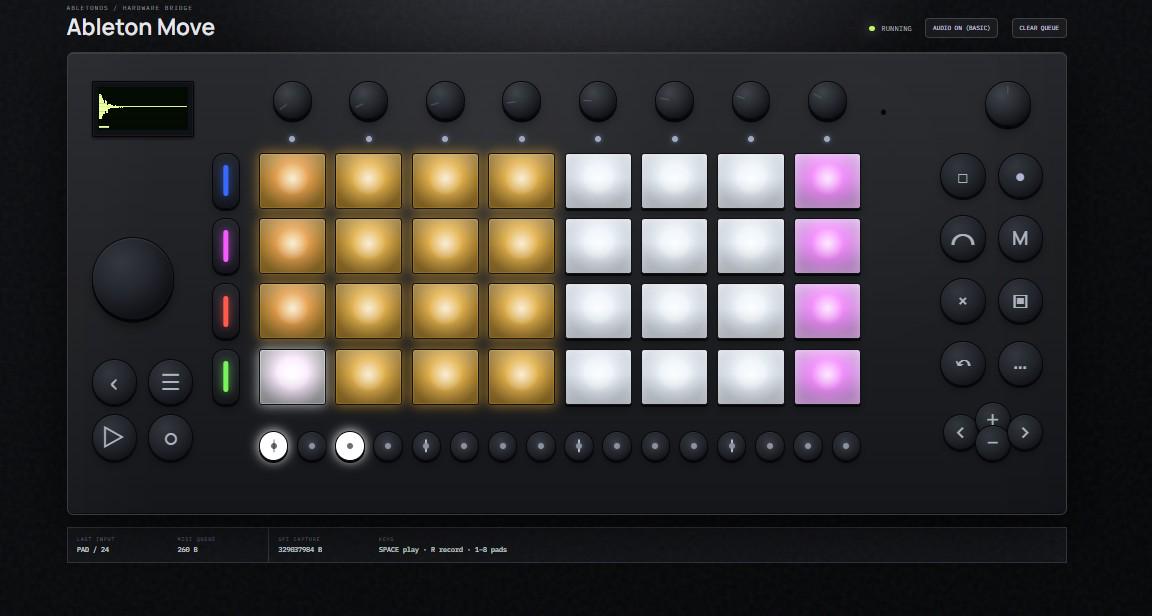
The browser control surface: display, pads, buttons, LEDs, and audio streaming.
What this is
Ableton Move ships as a sealed hardware device. This project takes the Move software from the official recovery image and runs it either in a Docker container or natively on a Raspberry Pi 4, then exposes its display, controls, LEDs, and audio through a web GUI at port 9090.
It's useful if you want to poke at the Move software stack, run it on hardware you control, or prototype alternative controllers for it.
How it works
Move expects to talk to real hardware — display, buttons, pads, LEDs, and an XMOS/SPI link. An LD_PRELOAD shim (emulator/shim/ablspi_shim.c, built to emulator/libablspi_shim.so) sits in front of those calls: it answers the handshake Move expects, captures what it would have sent to the display and LEDs, feeds browser input back in as if it came from real controls, and pulls the audio stream out. A Node.js server exposes all of that to a browser.
flowchart LR
  A[Official Move recovery image] --> B[Docker container / Raspberry Pi 4]
  B --> C[Move software + LD_PRELOAD shim]
  C --> D[Node.js server]
  D --> E[Browser GUI]
  E -->|control input| C
Use cases
Running Move in a container for development and reverse engineering, building a Pi 4 image that runs it natively, prototyping alternative hardware around the same software, or just studying how a standalone Linux/ARM music device is put together.
Status
Working: Move starts in the container and on a Pi 4, the GUI is reachable, display capture, browser controls, LED feedback, and audio streaming all work.
Still rough: native ALSA output, full hardware parity, pad/step behavior, and custom hardware mappings.
What's not in this repo
No Ableton files ship here — no .img, no binaries, no manuals, no extracted filesystems, no captures. You need your own copy of the official recovery image:
https://www.ableton.com/download/hardware/latest/move/recovery/
placed at local/images/Move-Image-2.0.5.img. local/ is gitignored, so it never ends up in the repo.
Requirements
Both paths need the recovery image above, plus e2fsprogs and fdisk/util-linux (used to read and write the ext partitions inside the image without mounting it):
brew install e2fsprogs                  # macOS
sudo apt-get install e2fsprogs fdisk    # Debian/Ubuntu
The container path additionally needs Docker with linux/arm64 support — native on Apple Silicon or ARM64 Linux, via QEMU binfmt on x86_64 Linux.
The Raspberry path additionally needs a Pi 4, a microSD card, an SSH key (~/.ssh/id_rsa.pub), and USB network access to the Pi at 172.16.254.1 (the default Move/Raspberry USB gadget address).
Quick start
Container, from the repo root:
cd container && ./build.sh && ./run-move.sh
Open http://localhost:9090. Full guide: container/README.md.
Raspberry Pi 4, from the repo root:
./raspberry/make-image.sh
Write the resulting image to a microSD, boot the Pi, then follow the copy/start steps in raspberry/README.md to reach http://172.16.254.1:9090.
Checking it's working
curl http://localhost:9090/api/status    # {"bridge":"running"}
curl http://localhost:9090/api/display   # {"available":true,"width":128,"height":64}
Audio should grow at roughly 176400 B/s (44.1 kHz stereo 16-bit PCM). See the container or Raspberry guide for the full walkthrough, including confirming non-zero PCM after pressing Play.
Project layout
emulator/     server.mjs (API + GUI server), public/ (frontend), lib/ (protocol
              helpers), shim/ (the C shim), tools/, tests/, docs/
container/    build.sh, run-move.sh, entrypoint.sh, README.md
raspberry/    make-image.sh, start-native.sh, README.md
docs/         MIDI mapping and control-logic reverse-engineering notes
Development
node --test emulator/tests/*.test.mjs

sh -n emulator/build-shim.sh container/build.sh container/run-move.sh \
      container/entrypoint.sh raspberry/make-image.sh raspberry/start-native.sh

./emulator/build-shim.sh   # rebuilds emulator/libablspi_shim.so (gitignored)
License
This repo's own code, scripts, GUI, and docs are AGPLv3 — see LICENSE. You're free to study, run, modify, and share it, but a modified network-accessible version has to keep its source open under the same license.
That license covers only this repo's original work. It grants no rights to Ableton's firmware, binaries, recovery images, manuals, or trademarks. This project isn't affiliated with or endorsed by Ableton.